SpamAssassin Score Explained: What 10/10 Really Means (2026 Technical Guide)
By SendBridge Team · Published May 16, 2026 · 18 min read · Email Deliverability
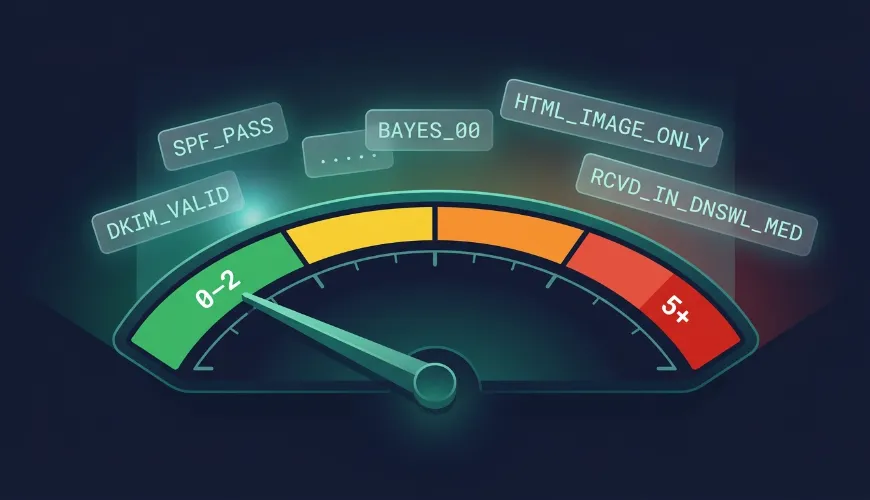
You ran a mail tester, got a score, and saw a wall of rule names: BAYES_99, DKIM_VALID_AU, MIME_HTML_ONLY, RDNS_NONE, RCVD_IN_DNSWL_HI. The tool told you "your score is 7.8." It did not tell you what any of that means or which line to fix first.
This guide is the technical breakdown - how SpamAssassin actually calculates a score, what the rules mean, why "lower is better" but mail testers show "higher is better," and how to read a raw report line by line. If you run your own mail server or you're tired of generic "avoid spammy words" advice, this is for you.
TL;DR: SpamAssassin sums the point value of every rule an email triggers. Lower is better - a perfect email scores near 0, and the default spam threshold is 5.0 (though many servers run stricter). Mail testers flip this into a 10-point "higher is better" display. Aim for a raw score of 0–2, not just "under 5." Check your SpamAssassin score free.
Quick Reference: SpamAssassin Score Ranges
| Raw SpamAssassin Score | Meaning | Risk |
|---|---|---|
| Negative (e.g. -2) | Strong legitimacy signals (valid DKIM, DNSWL listing) | ✅ Excellent |
| 0 – 2 | Clean - this is the real target | ✅ Ideal |
| 2 – 4 | Something specific is triggering - investigate | ⚠️ Monitor |
| 5.0 | Default spam threshold - flagged by default config | ❌ Fix now |
| 5 – 10 | Flagged as spam by most servers | ❌ Critical |
| 10+ | May be rejected outright, not just filtered | ❌ Severe |
Note: the default threshold is 5.0, but Apache's own documentation considers that aggressive. Many ISP-style deployments use 8.0 or 10.0; some corporate servers use 3.0. You can't control the recipient's threshold, so aim for 0–2.
The Core Concept: Lower Is Better (And Why Mail Testers Confuse This)
Here's the source of most confusion.
Raw SpamAssassin: lower is better. SpamAssassin runs an email through ~700 rules. Each rule that matches adds (or subtracts) a point value. The sum is the score. A perfect email scores near 0 or negative; a spammy one scores high. The default threshold is 5.0 - at or above that, mail is flagged as spam.
Mail testers: higher is better. Tools like mail-tester.com and SendBridge Mail Tester flip this into a friendly 0–10 scale where 10/10 is perfect. They do this because "10 out of 10" is more intuitive for marketers than "0.2 raw points."
So when a mail tester says 10/10, the underlying raw SpamAssassin score is roughly 0 (or negative). When it says 6/10, your raw score is somewhere around 4–5 - close to the spam threshold.
Both numbers describe the same thing from opposite directions. Once you internalize this, every report becomes readable.
How a SpamAssassin Score Is Calculated
The calculation is deliberately simple:
Final Score = sum of (every rule that matched × that rule's point value)Each rule is independent. SpamAssassin checks the email against every rule in its rule set, and for each one that matches, it adds that rule's configured score to a running total. Some rules add points (spam signals); some subtract points (legitimacy signals).
Rule categories
SpamAssassin rules fall into roughly five families:
- Authentication rules - SPF, DKIM, DMARC results. These can add penalty points for failures or subtract points for valid signatures.
- Content rules - body and subject pattern matching via regular expressions (spam phrases, ALL CAPS, suspicious formatting).
- Header rules - malformed or missing headers, suspicious
Receivedchains,Message-IDissues. - DNS/blocklist rules - checks against RBLs (Spamhaus, Barracuda) and allowlists (DNSWL).
- Bayesian rules - statistical classification (
BAYES_00throughBAYES_99) based on a trained corpus of known spam and ham.
Negative-scoring rules matter as much as positive ones
This is the part most guides skip. SpamAssassin doesn't just penalize bad signals - it rewards good ones. Some rules subtract points when legitimacy signals are present, like valid DKIM signatures and trusted authentication results.
Real-world example from a production mail server log:
spamd: result: -2 - BAYES_00,DKIM_SIGNED,DKIM_VALID,
DKIM_VALID_AU,DKIM_VALID_EF,SPF_PASS,RCVD_IN_DNSWL_NONE...
That email scored -2 - negative two. Why? BAYES_00 (Bayesian classifier is highly confident it's ham), plus DKIM_VALID and SPF_PASS (authentication passed), all contribute negative points that pull the score below zero. That's the goal: stack enough legitimacy signals that you go negative and have a huge safety margin.
This is why authentication isn't just about avoiding penalties - it actively earns you negative points that buffer you against any content rules that do trigger.
Real SpamAssassin Rules and What They Mean
Here are commonly-seen rules from real reports, what triggers them, and how to fix them. Point values vary by SpamAssassin version and server config, so treat these as directional.
Authentication rules
| Rule | What It Means | Fix |
|---|---|---|
SPF_PASS |
SPF check passed (negative score - good) | Already good - keep your SPF record accurate |
SPF_FAIL / SPF_SOFTFAIL |
Sending IP not authorized in SPF | Add your sending IP to the SPF TXT record; use -all |
DKIM_VALID / DKIM_VALID_AU |
DKIM signature verified and aligned (negative - good) | Already good |
DKIM_INVALID |
DKIM signature present but failed verification | Check selector, key length (use 2048-bit RSA), and that forwarders aren't breaking the signature |
DMARC_PASS |
DMARC alignment passed | Keep SPF/DKIM aligned with the From: domain |
DNS / reputation rules
| Rule | What It Means | Fix |
|---|---|---|
RCVD_IN_DNSWL_HI |
Your IP is on a high-trust DNS allowlist (strong negative score) | Earn allowlist status via good sending history |
RCVD_IN_DNSWL_NONE |
IP is in DNSWL but at "no trust" level (neutral) | Build sending reputation over time |
RCVD_IN_PBL |
Sending IP is in Spamhaus PBL (policy block list - for IPs that shouldn't send mail directly) | Don't send directly from residential/dynamic IPs; use a proper mail server or relay |
URIBL_DBL_SPAM |
A URL in your email body is on Spamhaus DBL | Remove or replace the flagged link; check link domains separately from sending domain |
RELAYCOUNTRY_XX |
Email relayed through a country with poor spam reputation | Review your sending route / relay configuration |
Content & structure rules
| Rule | What It Means | Fix |
|---|---|---|
MIME_HTML_ONLY |
Email has an HTML part but no plain-text alternative | Send as multipart/alternative with a plain-text version |
MIME_NO_TEXT |
No readable text body at all | Add a real text body, not just images |
HTML_IMAGE_RATIO_* |
Too much image, too little text | Increase text content; aim for 60%+ text |
RDNS_NONE |
Sending IP has no reverse DNS (PTR) record | Set up a PTR record at your IP/hosting provider |
MISSING_HEADERS |
Required headers absent (often To: or Date:) |
Fix your MTA configuration |
MISSING_MID |
No Message-ID header |
Ensure your sending system generates a valid Message-ID |
Bayesian rules
| Rule | What It Means | Fix |
|---|---|---|
BAYES_00 |
Bayes classifier: 0–1% spam probability (strong negative - best) | Nothing - this is ideal |
BAYES_50 |
50% spam probability (neutral) | Content is ambiguous; tighten copy |
BAYES_99 |
99–100% spam probability (large positive penalty) | Your content statistically matches the recipient server's spam corpus - major rewrite needed |
Important about Bayes: BAYES_99 is one of the trickiest rules because it's server-specific. The recipient server trained its Bayesian classifier on its own mail. An email that scores BAYES_00 on your test server might hit BAYES_50 somewhere else. You can't fully control this - you can only write clean, genuine content and build a track record.
How to Read a Raw SpamAssassin Report
If you have access to the raw email source (the .eml file, or "Show Original" in Gmail), look for the X-Spam headers:
X-Spam-Status: No, score=1.2 required=5.0 tests=BAYES_00,
  DKIM_SIGNED,DKIM_VALID,HTML_MESSAGE,SPF_PASS autolearn=ham
X-Spam-Score: 1.2
X-Spam-Level: *
Reading this line by line:
X-Spam-Status: No- not classified as spam (good)score=1.2- the raw total. Low. Good.required=5.0- this server's threshold. Anything ≥ 5.0 here would be flagged. Note this varies per server.tests=...- every rule that fired. Here:BAYES_00(clean),DKIM_SIGNED/DKIM_VALID(auth good),SPF_PASS(auth good),HTML_MESSAGE(neutral - just notes it's HTML)- *`X-Spam-Level:
** - score expressed as asterisks, rounded down (1.2 → one asterisk). Spammy mail shows****`. autolearn=ham- SpamAssassin auto-trained its Bayes filter on this as a legitimate message
The tests= list is the most actionable part. It tells you exactly which rules contributed. If your score is high, find the high-value rules in that list and fix those first - don't guess.
What Is a Good SpamAssassin Score?
The common advice is "stay under 5." That advice is incomplete and, in stricter environments, wrong.
Aim for a raw score of 0–2. Here's why:
-
You don't control the recipient's threshold. The default is 5.0, but many corporate servers use 3.0 to minimize spam getting through. Some ISP deployments use 8.0–10.0. A score of 4.5 sails through one server and gets blocked by another. A score of 0–2 is safe almost everywhere.
-
Scores fluctuate. Bayes results are server-specific, DNS/blocklist results change over time, and SpamAssassin versions weight rules differently. A 4.0 today could be a 5.5 next week on a different receiving server. A 0–2 buffer absorbs that variance.
-
Negative is achievable and ideal. With valid SPF, DKIM, DMARC, a clean IP, and good content, you can score negative - meaning the legitimacy signals outweigh everything. That's the real target for transactional and important mail.
| Score | Verdict |
|---|---|
| 0–2 | Target zone. Safe across nearly all server configs. |
| 2–4 | Acceptable but investigate. You're one config change from trouble. |
| 4–5 | Risky. Stricter servers are already filtering you. |
| 5+ | Failing. Default-config servers flag you as spam. |

The Critical Caveat: SpamAssassin ≠ Gmail
This is the single most important thing to understand, and most articles bury it.
Your SpamAssassin score has no direct effect on Gmail, Outlook, or Yahoo inbox placement. Those providers run proprietary machine-learning systems that weigh sender reputation, engagement signals (opens, clicks, complaints), and infrastructure quality. They don't consult SpamAssassin at all.
So where does SpamAssassin actually matter?
- Self-hosted mail servers - many run SpamAssassin as their primary filter
- Corporate / business email - Microsoft 365 environments, hosting providers, and managed mail services frequently use it
- As a diagnostic - even though Gmail ignores your SpamAssassin score, a bad score usually reflects underlying issues (broken auth, bad HTML, blocklisted IP) that Gmail's ML will notice through other signals
Think of SpamAssassin as a diagnostic layer, not a deliverability oracle. A clean SpamAssassin score doesn't guarantee Gmail inbox placement - but a bad one is almost always a symptom of problems that hurt you at Gmail too, just through different mechanisms.
This is exactly why a single spam-score check isn't a full deliverability test. (We cover the complete picture in our 7-check deliverability guide.)
How to Improve Your SpamAssassin Score (Priority Order)
Work top-down - the highest-impact fixes first:
-
Fix authentication. Get
SPF_PASS,DKIM_VALID, andDMARC_PASS. This both removes failure penalties and earns negative points. Biggest single lever. -
Set up reverse DNS (PTR). Eliminate
RDNS_NONE. If you run your own mail server, configure a PTR at your IP provider that resolves to a hostname matching your domain, with matching forward DNS. -
Send multipart/alternative. Kill
MIME_HTML_ONLYandMIME_NO_TEXTby always including a real plain-text part alongside HTML. -
Check blocklists. Resolve any
RCVD_IN_PBL,URIBL_*, or RBL hits. Don't send directly from dynamic/residential IPs. -
Clean up content. Reduce image-to-text ratio, remove URL shorteners, fix mismatched anchor text, drop ALL-CAPS subjects.
-
Fix headers. Ensure valid
Message-ID,Date,To:, and (for bulk)List-Unsubscribe. -
Build Bayes-friendly history. You can't directly fix
BAYES_99on someone else's server, but consistent, genuine, well-structured mail over time shifts statistical classification in your favor.
Re-test after each change - don't batch fixes, because then you won't know which one moved the needle.
Frequently Asked Questions
What is a good SpamAssassin score?
Aim for a raw score of 0–2 (lower is better). The default spam threshold is 5.0, but many servers use stricter thresholds (3.0 in some corporate environments), and you can't control which threshold the recipient uses. A negative score is even better and is achievable with valid SPF/DKIM/DMARC plus clean content. If a mail tester shows the friendly 10-point scale, aim for 9–10/10.
Why is lower better in SpamAssassin but higher better in mail testers?
SpamAssassin sums penalty points - more spam signals means a higher (worse) raw score. Mail testers like mail-tester.com and SendBridge Mail Tester invert this into a 0–10 "higher is better" display because it's more intuitive for non-technical users. A raw score near 0 displays as roughly 10/10.
Can a SpamAssassin score be negative?
Yes, and negative is ideal. Rules like BAYES_00, SPF_PASS, DKIM_VALID, and RCVD_IN_DNSWL_HI carry negative point values. When an email has strong legitimacy signals and minimal spam signals, the negatives outweigh the positives and the total goes below zero - giving you a large safety margin.
Does a good SpamAssassin score guarantee Gmail inbox delivery?
No. Gmail, Outlook, and Yahoo use proprietary ML systems and don't consult SpamAssassin. A clean SpamAssassin score doesn't guarantee inbox placement at those providers - but a bad score usually reflects underlying issues (broken auth, bad HTML, blocklisted IP) that those providers' filters detect through their own signals. SpamAssassin matters most for self-hosted and corporate mail servers.
What does the BAYES_99 rule mean and how do I fix it?
BAYES_99 means SpamAssassin's Bayesian classifier estimates a 99–100% probability that your email is spam, based on the recipient server's trained corpus. It carries a large penalty. It's hard to fix directly because it's server-specific - the fix is writing genuinely clean, non-promotional-pattern content and building a consistent sending history over time.
What's the difference between the SpamAssassin score and the spam threshold?
The score is your email's total (sum of triggered rules). The threshold (required_score, default 5.0) is the cutoff the receiving server uses to decide spam vs. not-spam. Score below threshold = delivered; score at or above = flagged. The threshold is set by each server admin, which is why the same email can pass one server and fail another.
How do I check my raw SpamAssassin score?
Send a test email to a tool that exposes the raw report - free SpamAssassin test tool shows the full rule breakdown and underlying SpamAssassin output free, with no signup. Alternatively, if you control the receiving server, read the X-Spam-Status and X-Spam-Score headers directly from the raw email source.
Test Your SpamAssassin Score Now
Reading about rules only gets you so far - see your actual report:
Run a free SpamAssassin test on SendBridge Mail Tester
You'll get the full rule list (every rule that triggered, with point values), your SPF/DKIM/DMARC status, blocklist results, and the raw score behind the 10-point display. Unlimited tests, no signup, no daily cap - so you can fix one rule, re-test, and see exactly what moved.
Related Reading
- How to Check Your Email Spam Score: The Complete 2026 Guide - the less technical companion to this article
- Email Deliverability Test: The 7-Check Pre-Send Checklist - where SpamAssassin fits in the full picture
- Mail-Tester.com Alternatives in 2026: 8 Free & Paid Tools Compared - tools that expose the raw SpamAssassin report
- Is Mail-Tester.com Accurate? An Honest Review After 50 Real Tests - how faithfully testers reflect the raw engine