Email Deliverability Test: The 7-Check Pre-Send Checklist (2026)
By SendBridge Team · Published May 16, 2026 · 14 min read · Email Deliverability
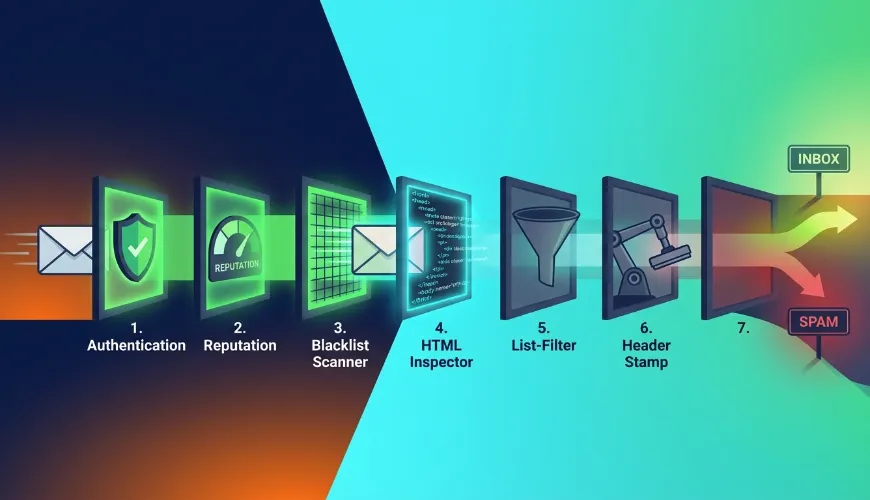
A 10/10 spam score and 90% inbox rate are not the same thing.
Most senders run a single spam-score test, see green, and ship. Three days later they're staring at a 12% open rate wondering what went wrong. The answer is almost always the same: a spam score tests one layer. Deliverability has seven.
This guide is the pre-send checklist we use ourselves before any high-stakes send - the same framework that catches the problems a spam-score tool can't see on its own. Run all seven checks and you'll have a clear picture of whether your campaign is ready to ship.
TL;DR: Deliverability fails for 7 reasons, not 1. Run these checks in order: (1) authentication, (2) IP/domain reputation, (3) blacklist status, (4) content/HTML, (5) list health, (6) infrastructure headers, (7) inbox placement. Start with SendBridge Mail Tester - it covers checks 1–4 in one report, free, no signup.
Quick Reference: The 7-Check Checklist
| # | Check | What It Catches | How to Test |
|---|---|---|---|
| 1 | Authentication | SPF/DKIM/DMARC misconfigs | Mail tester (1 min) |
| 2 | Reputation | Poor sender history | Google Postmaster + Microsoft SNDS |
| 3 | Blacklists | RBL listings | Mail tester + MxToolbox |
| 4 | Content & HTML | SpamAssassin triggers | Mail tester (SpamAssassin report) |
| 5 | List Health | Dead/invalid addresses | Email verification |
| 6 | Headers | Missing List-Unsubscribe etc. |
Raw email source review |
| 7 | Inbox Placement | Where mail actually lands | Seed-list test (GlockApps/GMass) |
Skip any of these and you're guessing.
Why a Single Spam-Score Test Isn't Enough
Spam-score tools - including our own free email deliverability test - are excellent at what they do: running your email through SpamAssassin and checking your DNS authentication. They catch the most common failures fast. Even with perfect authentication, your choice of infrastructure matters, so you should research the best transactional email api providers to maximize your chances of successful inbox placement.
What they can't see:
- Your sender reputation history at Gmail (months of engagement data)
- Whether Microsoft 365 corporate filters are flagging you specifically
- How your list quality compares to industry benchmarks
- Whether your IP has a negative reputation slope even if it's not blacklisted yet
- Where your email actually lands at each major provider
That's not a weakness of spam-score tools - it's just outside their scope. To get the full picture, you need to test in layers.

The 7 Checks (In Order)
The order matters. Each check builds on the previous one. If authentication fails, no amount of content tuning helps. If your list is full of dead addresses, perfect content still tanks your reputation. Work through them in sequence.
Check 1: Authentication (SPF, DKIM, DMARC)
Why it's first: if any of the three fail, your email is starting the race with a 2–4 point penalty before anything else even matters. This is the single biggest fixable factor in deliverability.
What to verify:
- SPF: your sending IP (or your ESP's IP, if you use a service) is in your domain's SPF TXT record. No
~allor?allsoftfails for serious sending - use-all. - DKIM: your DKIM signature uses a 2048-bit RSA key (1024-bit is being deprecated in 2026), and it's properly published at
selector._domainkey.yourdomain.com. Verify with a real test send - DNS publication alone isn't enough. - DMARC: published at
_dmarc.yourdomain.com. Start atp=nonefor monitoring, move top=quarantine, thenp=rejectonce you confirm all legitimate mail aligns.p=rejectis now expected by Gmail and Yahoo for bulk senders.
How to test (60 seconds):
Send a test email to SPF, DKIM and DMARC test. The report will show pass/fail for each of the three with detailed reasoning. If anything fails, fix the DNS record and re-test before moving on.
Common gotcha: SPF works at the envelope-from / Return-Path level, not the From: header. If you're using a third-party ESP that doesn't allow custom Return-Path, you might pass SPF for the ESP's domain but fail DMARC alignment. Check both.
Check 2: Sender Reputation
Why it matters: Gmail and Microsoft track your domain and IP reputation continuously. A bad reputation can route your mail to spam even if every other check passes. Conversely, a great reputation gives you cushion when individual sends have minor issues.
What to verify:
- Your Google Postmaster Tools dashboard for the sending domain - check Domain Reputation (Low / Medium / High), Spam Rate, and Authentication results
- Your Microsoft SNDS (Smart Network Data Services) dashboard if you send significant volume to Outlook/Hotmail addresses - look for filter results and trap hits
- Trend, not just point-in-time. A "Medium" reputation that's been declining for 3 weeks is worse than a "Medium" that's improving.
How to test:
- Sign in to Google Postmaster Tools with the email associated with your sending domain
- Add your domain (one-time DNS verification)
- Wait 24–48 hours for data to populate, then check the dashboards
The hard truth: if your reputation is poor, no checklist fixes it overnight. Reputation is built over 6–12 weeks of consistent good sending - small volumes, high engagement, low complaints. There's no shortcut.
Check 3: Blacklist Status
Why it matters: if your sending IP or domain shows up on a real-time blacklist (RBL), most major mail providers will block or heavily filter you. A single Spamhaus listing alone can kill 30%+ of your inbox rate.
What to check:
- Your sending IP against major RBLs: Spamhaus SBL/XBL/PBL, Barracuda, SORBS, SpamCop, Invaluement
- Your sending domain against domain-based blacklists: Spamhaus DBL, SURBL, URIBL
- Any URL you include in your email body - your link domains can be blacklisted even when your sending domain isn't
How to test:
The SendBridge Mail Tester checks the major RBLs automatically as part of every test. For a deeper scan across 90+ lists, use MxToolbox's blacklist checker.
If you're listed:
- Identify why you got listed - recent volume spike, spam trap hit, compromised account, abusive content
- Fix the underlying issue before requesting delisting (re-listing is worse than the original listing)
- Submit a delisting request through the RBL's official portal - Spamhaus, Barracuda, and SORBS all have public forms
- Wait. Spamhaus typically delists within 24–48 hours if your remediation is genuine; some RBLs take a week+.
Check 4: Content & HTML
Why it matters: SpamAssassin and similar engines parse your actual email and look for patterns associated with spam. Even with perfect authentication, content triggers can cost you 1–3 points.
What to verify:
- Subject line: no ALL CAPS, no more than one exclamation mark, no obvious spam phrases ("free money", "click now", "act fast")
- Body text-to-image ratio: at least 60% text, ideally 70%+. Pure-image emails are heavily penalized.
- URLs: no public URL shorteners (bit.ly, tinyurl, t.co) inside the body - use a branded short domain or full URLs
- HTML: clean, well-formed markup. No hidden text, no
display:nonecontent, nofont-size: 0. No tracking pixels disguised as 1×1 transparent images stacked everywhere. - Plain-text alternative: every email should be sent as
multipart/alternativewith both HTML and plain-text versions. Plain-text-only is fine; HTML-only is suspicious.
How to test:
Send the actual final version of your email to SpamAssassin rule breakdown and read the full SpamAssassin rule breakdown - every rule that triggered, with explanations and point values. Fix the high-cost rules first.
Often-missed trigger: mismatched link text and target URL. If your visible text says https://example.com but the href goes to https://tracker.shadydomain.com/redir?..., SpamAssassin flags it. Use clear, consistent CTAs.
Check 5: List Health
Why it matters: sending to dead, invalid, or spam-trap addresses is the fastest way to destroy your sender reputation. Every hard bounce, every spam trap, every "user unknown" response damages your domain's standing - and once damaged, reputation takes weeks to recover.
What to verify:
- Bounce rate: should be below 2%. Above 5% is a red flag at Gmail and will accelerate filtering.
- Spam complaint rate: must stay below 0.3% to avoid Gmail's bulk-sender penalties. Above 0.5% triggers automatic rate-limiting.
- Unknown-user rate: addresses that don't exist. Even small percentages (1–2%) signal a poorly-maintained list.
- Spam traps: invalid or recycled addresses that mail providers use to identify spammers. If you've bought a list or scraped contacts, expect traps.
How to test:
Run your list through an email verification service before each major send - especially after long periods of inactivity. Email verification checks syntax, domain validity, mailbox existence, and risk classification (catch-all, role-based, disposable, spam trap) for each address.
The math nobody talks about: removing 5,000 dead addresses from a 50,000-address list doesn't just lower your bounce rate. It increases your engagement rate (smaller list, same engaged subscribers), which improves your sender reputation, which lifts your inbox placement for the rest of the list. List cleaning is a deliverability multiplier, not just a cost-saver.
Check 6: Infrastructure Headers
Why it matters: since 2024, Gmail and Yahoo have required specific headers from bulk senders. Missing them is now an automatic strike. Most senders don't realize their ESP isn't adding these correctly.
What to verify in your raw email headers:
List-Unsubscribeheader with bothmailto:andhttps://options:List-Unsubscribe: <mailto:unsubscribe@yourdomain.com>, <https://yourdomain.com/unsubscribe?token=XYZ>List-Unsubscribe-Post: List-Unsubscribe=One-Click- enables Gmail's one-click unsubscribe button. Without it, Gmail starts adding warnings to your mail.Precedence: bulk- for newsletter-style sendsMessage-ID- must be present and well-formed (<unique-id@yourdomain.com>)Return-Path- must exist and match an aligned domain for DMARC alignmentFrom:display name - should match your brand, no impersonation
How to test:
Send to a Gmail address you control. Open the email, click the three-dot menu, select "Show original." Scroll through the raw headers and verify each item above is present.
Common failure: old WordPress sites using PHP mail() or default Postfix configurations skip List-Unsubscribe entirely. If you're sending from your own infrastructure, double-check your MTA config.
Check 7: Inbox Placement (Seed-List Testing)
Why it's last: the previous six checks tell you whether your email should reach the inbox. This one tells you whether it actually does - across the major providers, in real time.
What it measures:
A seed-list test sends your email to a pre-configured set of real inboxes at Gmail, Outlook, Yahoo, AOL, ProtonMail, iCloud, and major B2B providers. The tool then logs whether each one landed in:
- Primary inbox (the goal)
- Promotions or Updates tab (Gmail - acceptable for marketing, bad for transactional)
- Spam folder (bad)
- Missing entirely (worst - silently dropped)
How to test:
This is the one layer where free tools don't fully cut it. Options:
- GlockApps - industry standard for inbox placement testing, $59/mo for the entry tier, 360 test credits
- GMass Inbox Tester - built for Gmail-style sending, cheaper at $25/mo
- MailReach Spam Test - newer player, includes warm-up integration
When you actually need this: before launching a new domain, before any major campaign over 50k recipients, after major template changes, or when troubleshooting an open-rate drop. For typical weekly newsletters, the first 6 checks are enough.
Email Deliverability Rate: What's a Good Number?
If you're going to track one deliverability KPI, track inbox placement rate - the percentage of sent emails that land in the inbox (not spam, not missing).
| Sender Type | Acceptable | Good | Excellent |
|---|---|---|---|
| Transactional | 95% | 98% | 99%+ |
| Newsletter / Marketing | 85% | 90% | 95%+ |
| Cold outreach (B2B) | 70% | 80% | 90%+ |
| High-volume bulk | 90% | 95% | 98%+ |
Important distinction: delivery rate (the email was accepted by the receiving server) is not the same as inbox placement rate (the email actually reached the inbox, not the spam folder). Most ESPs report delivery rate because it's higher and prettier. Inbox placement is what you actually care about.
A 99% delivery rate with 60% inbox placement is a deliverability disaster dressed up as success.
How to Improve Email Deliverability (Quick Wins)
If you've run the checklist and your numbers aren't where you want them, here's the order to fix things in - biggest impact first:
- Fix authentication if anything in Check 1 failed. This alone can move you from "Spam" to "Inbox" at most providers.
- Verify your list before the next send. Removing dead addresses immediately reduces bounce rate and lifts the next campaign's reputation.
- Get off blacklists if Check 3 flagged any. Without this, the rest is wasted effort.
- Add missing headers from Check 6.
List-UnsubscribeandList-Unsubscribe-Postare non-negotiable for bulk in 2026. - Segment your list by engagement. Send only to recipients who opened within the last 90 days. This rebuilds your reputation faster than any other single action.
- Slow down. If you've been sending to large lists from a cold IP, throttle to 50–100/hour for the first week, then 500/hour, then 2,000/hour. Aggressive ramp-up is the #1 reason new IPs get blacklisted.
- Use a feedback loop. Register for FBL programs with Yahoo, AOL, and Microsoft. They'll tell you which recipients marked you as spam - so you can remove them immediately.
Run the Full Checklist on Your Next Send
If you're about to ship a campaign, here's the fastest version of the full checklist:
- Send the email to SendBridge Mail Tester → covers checks 1, 3, 4, and partial 6 in one report
- Open Google Postmaster Tools → check current reputation trend (check 2)
- Run your list through email verification tool → check 5
- Open "Show original" in Gmail on the test send → verify check 6 headers
- (Optional, high-stakes only) Run a seed-list inbox placement test → check 7
Total time: under 15 minutes. The cost of skipping this is days of damaged reputation that takes weeks to recover.
Frequently Asked Questions
What is the most accurate email deliverability test?
The most accurate test is a layered one: a spam-score check (covers content and authentication) plus a sender-reputation check (Google Postmaster Tools) plus an inbox placement test (seed-list testing across real mailboxes). No single tool covers all three. Start with email deliverability test for the first layer.
What is a good email deliverability rate?
For most sender types, 90%+ inbox placement is the working benchmark. Transactional email should hit 95%+, marketing email 85–95%, and cold outreach 70–90%. Delivery rate (just being accepted by the server) is a vanity metric - inbox placement is what matters.
How do I test email deliverability for free?
Use SendBridge Mail Tester (free, unlimited, no signup) for checks 1, 3, 4, and partial 6 - authentication, blacklists, content, and basic header checks. Combine with Google Postmaster Tools (also free) for reputation data. Inbox placement testing is the one layer where free tools are limited.
Why is my email going to spam even with a high spam score?
A high spam score means your content and configuration are clean - but spam placement is driven by additional factors: sender reputation history, recipient engagement signals (opens, replies, deletes, "mark as spam"), list quality, and engagement of similar recipients. A 10/10 score with a poor sender reputation will still hit spam at Gmail. Work through checks 2, 5, and 7 in this guide.
How often should I test email deliverability?
Run the full checklist before every major campaign (large sends, new templates, new domains). For ongoing newsletters, run checks 1, 3, and 4 weekly, and check 2 (reputation) monthly. Reactive testing - only when something breaks - is too late.
What's the difference between deliverability and inbox placement?
Deliverability is whether your email was accepted by the receiving server (no bounce). Inbox placement is whether it landed in the inbox specifically, versus spam or promotions. Most senders conflate the two. A 99% delivery rate can still mean 40% of your mail ends up in spam.
Can I improve deliverability without changing my sending tool?
Yes - most deliverability problems are infrastructure issues (authentication, list quality, content, headers) that exist regardless of your ESP. Fix those first. Switching ESPs without fixing the underlying issues just moves the problem.
Related Reading
- Mail-Tester.com Alternatives in 2026: 8 Free & Paid Tools Compared - for choosing the right spam-score tool
- How to Check Your Email Spam Score: The Complete 2026 Guide - deep dive on check #4
- SpamAssassin Score Explained: What 10/10 Really Means - the engine behind most spam-score tools
Or just run the first 4 checks right now. Free, unlimited, no signup.