How to Fix Embarrassing Email Mistakes Fast
By SendBridge Team · Published Oct 05, 2026 · 12 min read · Tutorials
The average office worker sends dozens of emails a day. At that volume, a mistake is not a question of if; it is a question of when. The problem is rarely the typo or the wrong attachment itself. It is what happens in the two minutes after you notice it, when most people either recover cleanly or make it worse by panicking, over-apologizing, or simply doing nothing and hoping the other person did not notice.
This guide walks you through both sides of that equation. You will learn what to do the moment something goes wrong, how to use the recall and unsend tools available on the platforms you already use, how to write a correction email that does not draw more attention to the mistake than necessary, and how to build the kind of pre-send habits that make these moments a lot less frequent.
Whether the email went to the wrong person, contained the wrong information, or just had an embarrassing error you cannot stop thinking about, getting it wrong is rarely the issue. Knowing what to do next is what actually counts.
What Counts as an Email Mistake That Needs Fast Action
Not every imperfect email needs an emergency response, but some mistakes require you to act immediately before the damage spreads. Understanding which category your mistake falls into helps you prioritize your next move and respond with the right level of urgency.
The most common email mistakes that warrant fast action include:
- Wrong recipient: Sending a message to the wrong person, especially if it contains sensitive, confidential, or personal information, is one of the most urgent mistakes you can make. This includes accidentally hitting Reply All, forwarding an internal thread externally, or selecting the wrong contact from an autocomplete list.
- Missing attachment: You wrote "please see attached" but sent the email without the file. While this is lower-stakes than a wrong recipient, it still requires a fast follow-up to maintain credibility and avoid unnecessary delays.
- Typo in key information: Errors in pricing, deadlines, names, dates, product details, or any figures that the recipient will act on can cause real confusion or financial misunderstandings. These need to be corrected before the other party moves forward on wrong information.
- Incorrect link or data: A broken link, an outdated document, or a wrong file attachment can waste your recipient's time and undermine trust in your attention to detail.
- Unclear or misleading tone: An email that could be interpreted as rude, unprofessional, or inflammatory, especially in a tense business situation, may need a clarifying follow-up before relationships are damaged.
The faster you identify the type of mistake, the faster you can choose the right fix.
How to Fix Email Mistakes Fast After Sending It
The moment you realize you have made an email mistake, your instinct might be to panic, but the best thing you can do is pause for two seconds and assess the situation clearly. Acting with a calm, structured approach will lead to a much better outcome than firing off a rushed, error-filled correction email. Speed matters, but so does composure.
Follow these steps immediately after you notice the mistake:
- Assess the severity of the mistake. Ask yourself: Does this email contain sensitive information that reached the wrong person? Could it cause financial, legal, or reputational harm? Or is it a minor embarrassment, like a small typo in a casual update? Your level of urgency should match the actual risk involved.
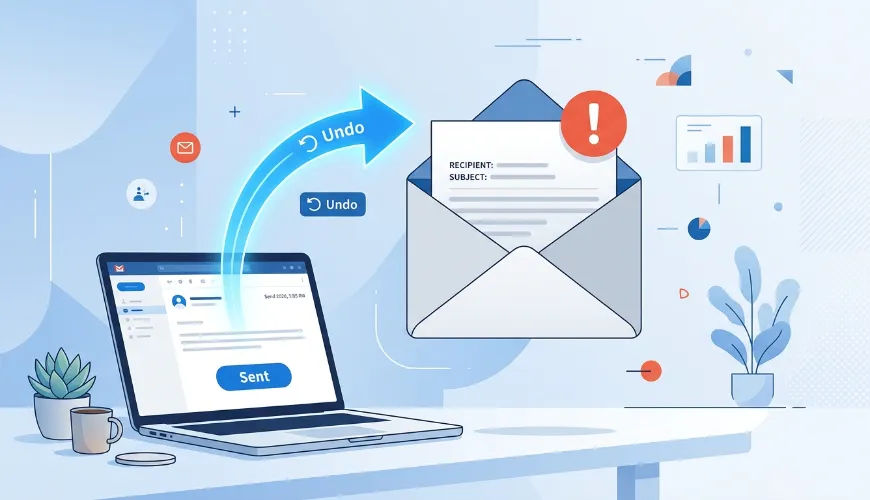
- Check if an undo send or recall option is available. Most modern email platforms give you a brief window to cancel a send before the email is delivered. Jump to your platform settings immediately, because this window closes quickly, usually within 5 to 30 seconds, depending on your configuration.
- Send a correction email if recall is not possible. If the email has already been delivered and cannot be recalled, your next best move is a short, professional follow-up that addresses the error directly and provides the correct information.
- Notify affected parties if the mistake is serious. If confidential data was sent to the wrong person, you may need to reach out directly by phone or message, ask them to disregard or delete the email, and escalate internally depending on your organization's data protocols.
- Document what happened if the mistake has compliance or legal implications. In regulated industries, a mistakenly sent email may need to be reported to your manager or compliance team.
Moving through these steps quickly and methodically keeps you in control of the situation rather than reacting emotionally.

Can You Unsend or Recall an Email
Whether you can unsend or recall an email depends almost entirely on which platform you are using and how quickly you act. The good news is that the two most widely used email platforms, Gmail and Outlook, both offer options for catching a mistake before or shortly after it is delivered.
Gmail Undo Send Feature
Gmail offers an Undo Send feature that gives you a brief cancellation window immediately after you click Send. By default, this window is set to 5 seconds, but you can extend it in your settings.
How to adjust it:
- Go to Settings (the gear icon) and click "See all settings."
- Under the General tab, find the "Undo Send" option
- Set your cancellation period to 10, 20, or 30 seconds
- Save your changes
Once this window closes, the email is delivered, and Gmail has no native recall function. This makes it critical to extend your Undo Send window proactively, before a mistake ever happens.
Outlook Recall Feature
Microsoft Outlook offers a more robust Message Recall feature that can work even after an email has been delivered, but it comes with important limitations.
How to use it:
- Open your Sent Items folder
- Double-click the email you want to recall
- Click the three-dot menu or go to Message, then Actions
- Select "Recall This Message"
- Choose to either delete the unread copy or replace it with a corrected version
Limitations to be aware of:
-
Recall only works if the recipient is using Outlook within the same Microsoft Exchange organization
-
If the recipient has already opened the email, the recall will fail
-
It does not work across different email providers, such as sending to a Gmail address
When Recall Is Not Possible
If you are using different email platforms or if the recall window has already passed, your best option is to move straight to a professional follow-up email. This is not a failure; it is simply the next correct step.
How to Correct a Sent Email Professionally
A well-crafted correction email can actually reinforce your professionalism rather than damage it. When you handle a mistake with clarity and confidence, recipients see someone who takes communication seriously and holds themselves accountable. The key is to keep the correction concise, clear, and free of excessive apology or over-explanation.
Here is what a good correction email should include:
Subject line examples:
- Correction: [Original Email Subject]
- Follow-Up: Please Disregard My Previous Email
- Updated Information: [Topic]
- Revised Attachment: [File Name]
Structure to follow:
- Open with a one-sentence acknowledgment of the error. Do not dwell on it or write a lengthy preamble about how sorry you are.
- State the correction clearly and directly. Provide the right information, the correct attachment, the accurate figure, or the proper recipient context.
- Close with a brief, confident note that invites any questions. Keep the tone composed and forward-looking.
Example correction email:
Subject: Correction: Project Timeline PDF
Hi [Name],
Please disregard my previous email. I inadvertently attached an outdated version of the project timeline. The correct document is attached here. Apologies for any confusion, and let me know if you have any questions.
Best regards,
[Your Name]
This approach is professional and efficient, and it shows that you caught and corrected the issue without making it a bigger deal than it needs to be.
What to Do When the Email Has Already Been Read
If the recipient has already opened the email before you could recall it or send a correction, the situation calls for a slightly more direct and personal approach. Pretending the mistake did not happen is rarely a good strategy, especially if the error involved incorrect information, the wrong recipient, or anything that could cause confusion or concern.
Here is how to handle it when the email has already been read:
- Acknowledge the mistake quickly and directly. A short, prompt follow-up shows awareness and professionalism. Waiting too long to address a read mistake can make it look like you hoped no one would notice.
- Clarify any misinformation without over-explaining. If you sent incorrect data, pricing, or instructions, clearly provide the correct version. You do not need to write a full post-mortem on how the error happened.
- Avoid excessive apologizing. One sincere acknowledgment is sufficient. Repeating apologies multiple times in one email can feel performative and actually draws more attention to the mistake than a clean, direct correction would.
- Address any potential consequences proactively. If the wrong information could lead someone to take action based on it, such as placing an incorrect order or quoting incorrect pricing to a client, flag it specifically and make sure they know not to proceed until they have the correct version.
- If the email went to the wrong person entirely, reach out directly. A quick message asking them to disregard and delete the email, especially if it contained private or sensitive content, is both courteous and professionally appropriate.
Most people understand that email mistakes happen. How you handle the recovery is what leaves the lasting impression.
How to Prevent Embarrassing Email Mistakes in the Future
The most effective way to fix an email mistake is to stop it from happening in the first place. A few simple habits and tools added to your workflow can dramatically reduce the chance of sending an email you will immediately regret. These are not time-consuming changes but small, consistent practices that quickly become second nature.
Use this pre-send checklist before clicking Send on any important email:
- Double-check the recipient field. Before anything else, verify that every address in the To, CC, and BCC fields is correct. Pay special attention when replying to group threads or using autocomplete, which can easily pull in the wrong contact.
- Reread the subject line. Your subject line sets expectations and is often the first thing a recipient judges. Make sure it accurately reflects the content of the email.
- Verify all attachments are included and correct. Briefly open the attached files to confirm you are sending the correct version and that they are not corrupted or empty.
- Scan for factual accuracy. Double-check any numbers, dates, names, prices, or deadlines before sending. These are the details most likely to cause real problems if wrong.
- Keep your contact data clean and up to date. Many embarrassing mistakes, such as a misspelled first name, an outdated job title, or an email sent to someone who left the company months ago, start with stale records in your CRM rather than a slip at the keyboard. Tools that enrich and refresh contact records let you nurture your leads with great data automatically, so the details in your emails are correct before you even start typing.
- Enable a delay-send or schedule feature. Most email platforms allow you to schedule emails to send after a short delay. Even a 5-minute buffer gives you time to catch a mistake before the email is delivered.
- Read the email out loud before sending. This simple technique forces you to slow down and often reveals errors or confusing phrasing that reading silently misses.
One more tool worth adding to your routine is a grammar checker. It is easy to miss typos, grammatical slips, or awkward phrasing when you are reading your own writing, because your brain tends to fill in what it expects to see. Running your email through a grammar checker before sending gives you a fast, objective second pass that catches the kinds of errors that slip through even careful manual proofreading. It takes seconds and can save you from sending a message that undermines your credibility.
Building these habits into your email routine takes very little extra time but significantly raises the quality and reliability of every message you send.
Take Control of Your Email Communication
Email mistakes are a normal part of professional life, and the ability to handle them quickly and gracefully is a skill worth developing. Whether you catch the error in time to use the unsend feature, need to send a clean correction email, or have to address a mistake that has already been read, there is always a path forward.
The key is to act fast, stay calm, and communicate clearly. Speed minimizes the damage, and professionalism in your recovery is what people actually remember. Start improving your email accuracy today by building a simple pre-send checklist and reviewing every message before it leaves your inbox. Maintaining this same level of professionalism is equally important when you need to learn how to write a sick day email that keeps your manager informed.