How to Use AI to Write an Email Without Being Detected with Clever AI Humanizer
By SendBridge Team · Published Oct 12, 2026 · 9 min read · Tutorials

AI tools now help people write emails fast. Yet, text made only by machines often sounds too smooth or artificial, which makes it easy to notice. If you want to learn how to write emails that sound natural (even when AI helps), you're in the right place. With the right mix of automation and quick manual tweaks, anyone can keep their voice in the message and stay in full control of the result.
Our article shows how to create real-sounding AI emails, spot signs of robotic writing, and apply simple steps that make each message read as if written by you.
Why AI Use for Emails Matters
Modern tools that use AI to generate an email help people write faster and keep messages clear. They help craft replies, organize outreach, and shape text that fits a brand's tone. For many users, this process replaces hours of manual work with ready drafts that still sound polished. Yet when a message depends only on automation, it often loses emotion and the small human details that make a note feel real.
Pros of AI for emails:
- Saves time on repeated replies or updates.
- Keeps grammar correct and tone steady.
- Adapts phrases for different audiences.
- Handles large volumes of communication with ease.
Cons of AI for emails:
- Misses natural warmth and small personal cues.
- Repeats patterns that sound mechanical.
- Produces overly formal or flat sentences.
- Raises the chance of AI detection or weak engagement.
AI works best as a helper, not a full writer. A short review or quick tone fix turns a machine draft into a message that sounds natural and human.

How to Tell if an Email Was Written by AI
An AI-generated email often looks polished but lacks the natural rhythm of human speech. It may sound correct in grammar, yet feel distant or mechanical.
Main signs of an AI-generated email:
- Sentences follow the same pattern and pace.
- Tone stays flat with no real emotion.
- Repeated buzzwords appear, such as optimize, streamline, or leverage.
- The message feels too balanced and clean.
- Missing small personal touches, context, or uneven phrasing.
Online readers discuss these habits openly. Here's an interesting Reddit discussion where people share ways to spot AI-written messages.
Also, you can test your email with a detector such as ZeroGPT, a tool many users trust to verify if a message looks AI-generated. It shows the AI probability score and helps confirm that your text sounds human before you send it.
How to Use AI to Write an Email That Sounds Human
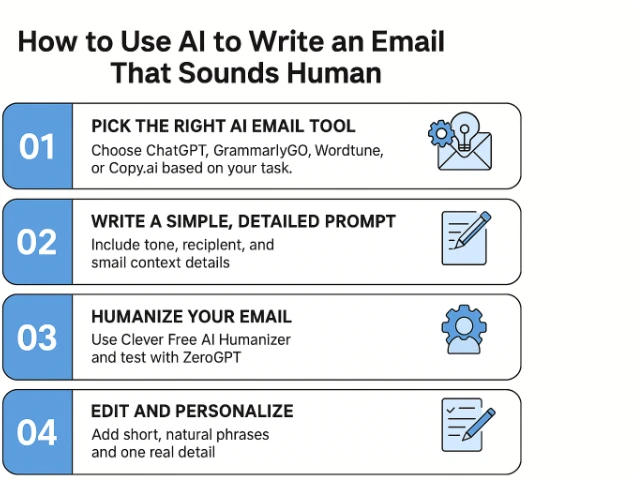
Now let's look at which AI humanizer tools work best for natural-sounding content, how to use AI to draft emails from scratch, and what to tweak so your message feels personal.
Step 1: Pick the Right AI Email Tool
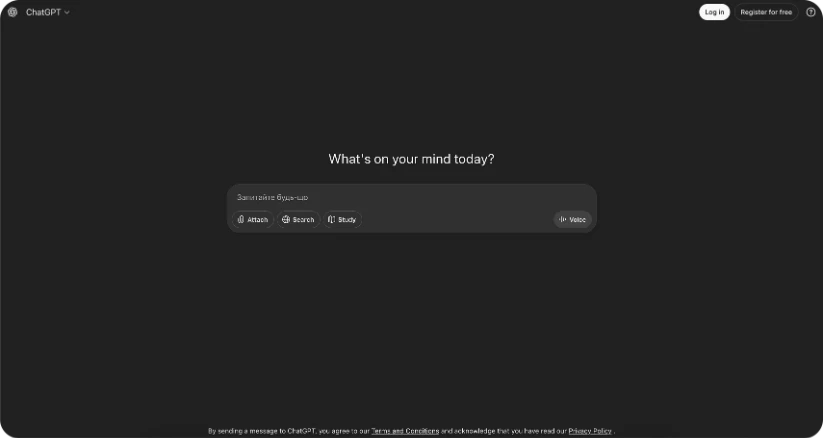
Select a platform that matches your workflow. ChatGPT, Claude.ai, or GrammarlyGO help users manage email tasks and create drafts for Gmail or Outlook. Each option offers tone control and text clarity suited for quick communication.
On Reddit, users share opinions about which platform works best for professional correspondence. Most agree that ChatGPT remains the most dependable option for client messages and fast work replies.
The best choice depends on the purpose. Some tools suit formal tone, others short or creative formats.
Step 2: Write a Simple, Detailed Prompt
Strong prompts form natural and precise results. A clear prompt helps AI understand your goal and tone before it creates the draft. The more details you give, the closer the text stays to your real voice.
Example:
"Write a short follow-up email to a customer named David after delivery. Keep the tone polite and confident, and add a short thank-you note."
This short instruction gives AI all the main elements - the recipient, purpose, and tone. Add small context details such as the product name, date, or short reminder to make the result sound real.
For example:
"Write a short follow-up email to a customer named David who received his new sound system yesterday. Keep the tone polite and confident, thank him for choosing us, and offer quick help if he needs setup support."
This version feels more human because it reflects how people actually write - short, direct, and clear. A well-structured prompt like this helps AI create an email that shows personality instead of a mechanical tone.
Step 3: Humanize Your Email
Each AI-written message must pass through a humanizer to achieve a true human flow. Use Clever Free AI Humanizer and follow these four steps:
- Copy your AI draft. Take the version you created in ChatGPT or another tool including the full message.
- Paste it into Clever Free AI Humanizer. Open the site, insert your text, and check formatting before processing.
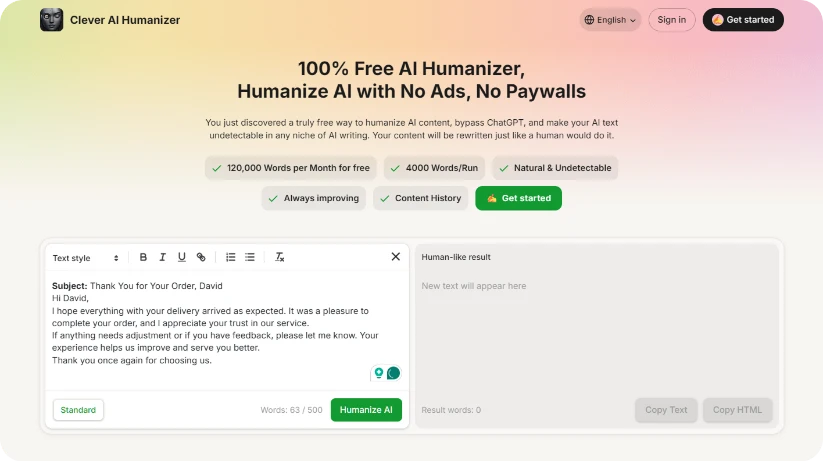
- Press "Humanize." The tool reshapes rhythm, replaces stiff patterns, and adds sentence variation that mimics natural writing.
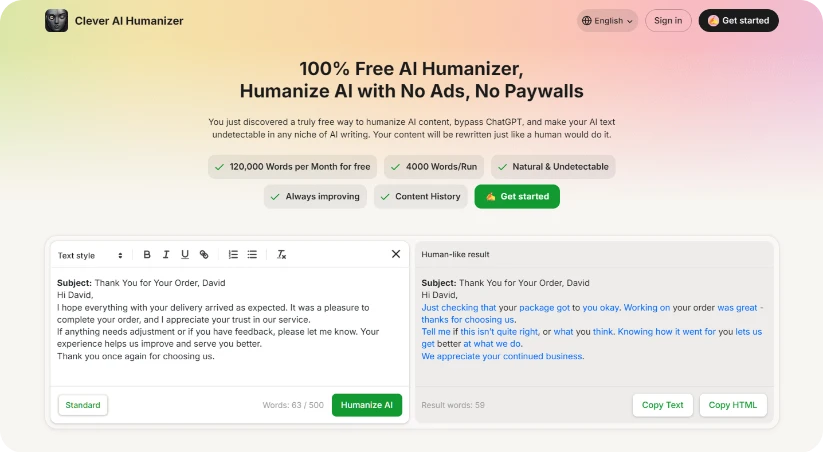
- Review and save the result. Read the text aloud and make small tweaks if needed. You'll notice the new tone - smoother, balanced, and completely authentic.
This method turns raw automation into real communication. When you combine a clear prompt, short manual edits, and a humanizer, the result feels human and natural. You can test this with ZeroGPT.
Before humanization, a typical AI email shows a high detection score - often around 80-90% AI-written. The tone stays flat, and every line sounds too similar. After you pass the same message through a humanizer and fix a few phrases, the score often drops to around 8-15% and the text now reads as more "human".
Step 4: Edit and Personalize
In most cases, humanizer alone is enough - especially for short or everyday emails. The humanizer smooths robotic flow and adds the kind of rhythm people use in normal conversation.
Still, for an important message, take one extra minute to review it yourself. Read it once, fix one or two phrases, or add a line that shows real attention.
This quick step keeps the professional tone but restores emotion and intent - a small touch that turns a processed draft into a real conversation.
Recommended AI Tools for Managing Email Workflows
AI tools now help teams manage email tasks faster and keep messages clear. A complete setup covers idea creation, tone control, and delivery. Here are a couple of tools you can use in your own workflow. They each have different purposes, and you can combine them:
| Purpose | Tool | Function |
|---|---|---|
| Draft creation | ChatGPT | Produces first email drafts and ideas |
| Tone control | GrammarlyGO | Adjusts text for clarity and tone consistency |
| Style and phrasing | Wordtune | Refines language to sound more natural |
| Humanization | Clever Free AI Humanizer | Removes robotic tone and restores human rhythm |
| Workflow control | Superhuman | Helps users manage Gmail and Outlook messages |
| Quality review | Originality.ai | Allows users to evaluate AI-driven email accuracy and detection score |
Together, these tools keep AI for emails practical and reliable. They save time while preserving real tone and intent. When AI agents work in harmony with your edits, your email process becomes faster and fully authentic.
Why Authenticity Beats Automation Every Time
AI now reshapes the way people use email and express ideas. What once served as a routine tool has become proof of how humans and machines can work together. The real change appears not in automation but in awareness - readers now notice tone, rhythm, and purpose faster than before.
The next step in progress stands in authenticity. As AI gains fluency, originality turns into the main strength. Each natural pause or honest line separates a real author from a mechanical draft. The future belongs to those who use technology yet keep their own identity.
The task is not to hide AI but to make every message sound true enough that the tool fades away and the writer's voice stays visible.
FAQ
How to generate an email with AI tools?
To generate an email with AI, start with a trusted platform that matches your needs. For quick and simple business replies, use ChatGPT or Copy.ai - both create complete drafts in seconds. If you want cleaner grammar and tone balance, GrammarlyGO and Wordtune provide refinement tools that keep text consistent with your voice.
After the system forms the draft, check it for natural flow. If some lines sound too flat, replace one or two phrases with what you would say in real life.
For an extra check, you can run the email through a detector like ZeroGPT to see how human it appears, or a humanizer to lower any AI pattern score before sending.
Can readers tell when AI wrote an email?
When AI writes an email, it usually follows the same sentence pattern and keeps a neutral tone. Real people use uneven rhythm, shorter phrases, and small emotional cues. Adding a few personal words or short pauses helps your text feel human again.
What are the best AI email assistant tools for daily use?
The best AI email assistant tools combine clear structure, tone control, and workflow support. They help users write faster while keeping full control over message style and intent.
- ChatGPT - builds complete emails from short prompts and adapts to context.
- GrammarlyGO - improves grammar and adjusts tone for professional clarity.
- Wordtune - rewrites sentences to sound natural and human.
- Copy.ai - creates quick templates for marketing or client messages.
- Flowrite - automates replies and short follow-ups directly in your inbox.
Each tool helps handle different stages of the process. Together, they save time, maintain tone accuracy, and help every email sound confident and real.
How to make sure AI emails sound natural?
After you form the text, read it aloud to check flow. Replace formal phrases with short, spoken ones. Small imperfections make a message believable and prevent it from sounding mechanical.