How to Use Email Automation to Collect More Google Reviews
By SendBridge Team · Published Oct 16, 2026 · 9 min read · Tutorials
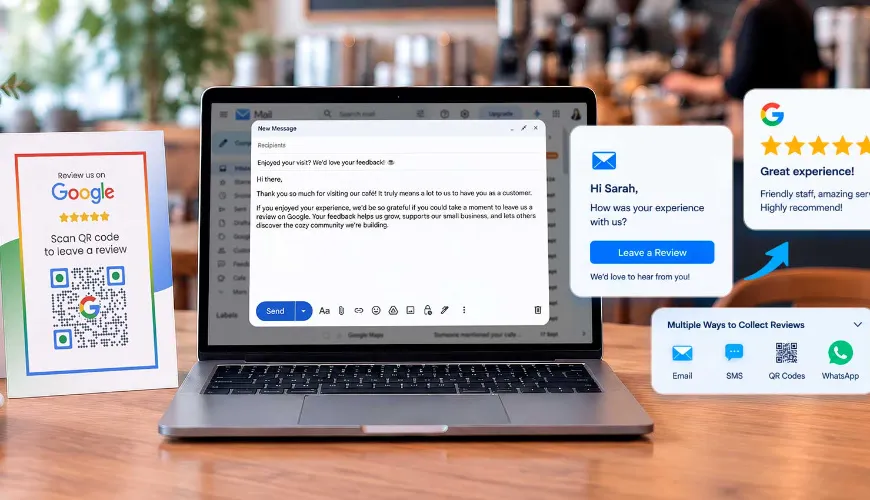
Google Reviews organically influence local search rankings and consumer trust, improving brand visibility for small businesses online.
As a business owner, it's in your best interest to invite customers to share their experiences with your brand, but doing it individually can be exhausting.
The problem lies in scalability. Sending individual review requests manually can become impossible at scale due to the effort required, something that smaller businesses can struggle with.
Email automation eases this issue by enabling a structured, automated review request process, allowing businesses to send timely emails to thousands of subscribers without costing time and effort.
How to get the most out of your automated review requests
Setting up your automated emails can be accomplished with the right tools (even low-cost email campaign services support triggered review requests), but making the most out of each request takes more than an efficient workflow. To maximize the value of your emails, you should first do the following.
Find the right time
Timing is essential when requesting reviews through email, and even more essential when automating them.
The time between an interaction and your email should be long enough that the experience is still fresh in your customer's mind, but not too short that they haven't formulated an opinion.
The right time depends on the type of business you're running. For example, salons or barbershops will benefit from sending review requests after an appointment, while restaurants can send theirs hours after dining.
The collection of reviews for your business can be timed perfectly by following the framework below:
- Determine the moment the experience is completed: Identify when the customer finishes interacting with your business and processes their experience.
- Consider what your customer is likely to do after: If you run a restaurant, your customers are likely to be out on the road after dining with you. Sending a request at this point could result in your email being buried under other notifications.
- Test out different timings: Try sending review requests at different times to see how they perform. When doing so, track metrics like Click-Through Rate (CTR) and Unsubscribe Rate.
- Choose a timing that ensures consistent, timely engagement: Based on your tests, implement the timing that results in consistent engagement without waiting too long before contacting customers.
Personalize your review requests
Email automation speeds up feedback collection, but asking for reviews this way can sound robotic and impersonal if you're not careful. This can make customers less motivated to provide comprehensive reviews or, worse, not answer at all.
Personalizing review requests makes them genuine questions that check in on your customer's experience.
Here are a few things you can do to make your requests feel more personal:
- Use your customer's name in your emails
- Include the name of the service your customer engaged with
- Mention the location or branch they visited (If you have several)
- Reference when they interacted with your business
- Keep the tone conversational
- Create different email templates for each group of customers
Follow up without overwhelming
Even with the best timing, customers can forget to engage with your email. This is a missed opportunity avoided by sending follow-up emails.
It's important not to be overly persistent with this kind of email, as it can annoy your customers to the point that they refuse to engage with you at all. However, you also don't want to send them long after your initial request, as you want to keep their memory of the experience fresh.
Here are a few tips for sending follow-up emails:
- Send them three to five days after your first request
- Keep it shorter than the original email
- Only send one follow-up email
- Configure your automated workflow to prevent sending a follow-up email after a review was sent

Maintaining email deliverability with your workflow
Whether or not customers answer your requests relies on timing, messaging, reminders, and deliverability. Due to the nature of email services, that last factor can get quite technical.
Email deliverability refers to your capacity to deliver emails to your subscribers' inboxes. It is also a metric that helps you assess the effectiveness of your email marketing efforts.
While automated emails reduce your workload significantly, they don't guarantee delivery to your customers' inboxes. Several factors come into play even after your platform sends out your review requests, all of which can be managed with the following steps.
1. Authenticate your sending domain
A sending domain is what email services like Gmail and Yahoo use to decide whether your emails are sent to your customer's inbox or spam folder. Having it authenticated ensures that your emails are seen by your customers.
To authenticate your sending domain, set up the following email authentication methods:
- Domain-based Message Authentication Reporting and Conformance (DMARC)
- DomainKeys Identified Mail (DKIM)
- Sender Policy Framework (SPF)
2. Monitor the important metrics
While sending out your emails, pay attention to key email metrics to gain insights into your deliverability.
Essential email metrics to monitor include:
- Hard bounce rate - Informs you about permanently unreachable email addresses.
- Soft bounce rate - Tells you about temporary issues in your emailing caused by temporary blocklisting, full mailboxes, connection errors, and greylisting.
- Open rate - Gives insight into customer engagement and the effectiveness of your subject lines.
- Click-through rate - Measures how many users clicked on the links you sent in your email.
- Click-to-open rate - Measures how many users clicked on your email over the number of emails delivered.
- Inbox placement rate - Tells you the percentage of emails actually reaching your customers' inboxes.
- Unsubscribe rate - Informs you of the percentage of people who lost interest in your marketing or brand.
- Spam complaint rate - Indicates a need to adjust your email content or sending practices.
All of these metrics can tell you how deliverable your emails are and where the problems can lie, allowing you to make changes to your email marketing efforts.
3. Maintain the quality of your email list
A high-quality email list means that your subscribers are active and engaged with your brand, which decreases your email bounce rate, increasing deliverability.
To maintain this quality, you can implement a sunset policy. This is a method of managing inactive subscriptions by regularly removing unengaged customers from your list.
This has the added benefit of improving your sender reputation with internet service providers (ISPs), as consistent communication with inactive addresses is often seen as a red flag.
Other ways to manage your email list are:
- Using an email verifier or a sender score monitoring tool to identify possible issues with your list.
- Creating abuse@ and postmaster@ email addresses for feedback loop messages and spam complaints, something that ISPs can detect.
- Avoid buying or renting an email list, as email service providers can detect and reject it when importing it into your mailing platform.
4. Create an email preference center
An email preference center is where subscribers can manage and customize their email preferences. Without it, users can only choose to receive or unsubscribe from your emails.
Creating an email preference center lets your customers choose which emails they receive, leading to better engagement than if they were to entirely unsubscribe from your email list.
5. Avoid spam traps
Spam traps are email addresses created by ISPs and email community organizations to catch spammers who purchased or rented an email list or those with suspicious email practices.
Sending an email to a spam trap will cause the ISP to flag the sender and add them to a deny list.
Aside from keeping and maintaining a clean and healthy email list, here are a few ways to avoid spam traps:
- Implement a double opt-in process so subscribers can confirm their email addresses before receiving your emails.
- Use email validation tools to validate email addresses upon sign-up.
- Look for high bounce rates, increased spam complaints, and feedback loops.
Marketing channels that can complement your email efforts
Email is an effective channel for gathering feedback, but they don't have to be your only one. With the right implementation, several other marketing channels can supplement your efforts.
QR codes
Emails are typically detached from the physical space, requiring customers to either wait for your review request or to find a means to provide it themselves. QR codes don't have this problem.
QR codes don't just bridge the gap between the physical and digital worlds; they can also be present when customers receive a product or service. This presents businesses with the opportunity to collect feedback as soon as the user is ready.
When using customer review software, you can place review QR codes on physical touchpoints like product packaging or receipts, so your review request email serves as a follow-up instead.
Internet-based messaging apps
With 5.66 billion social media user identities online as of October 2026, apps like WhatsApp and Facebook Messenger make it easier to open direct, real-time communication with online consumers, complementing email marketing efforts, especially when collecting feedback.
Software that automates multi-channel workflows, like HubSpot, allows you to set up a sequence that sends a follow-up message while the customer's experience is still fresh in their mind.
SMS
While emails are great for encouraging detailed reviews, they can sit in an inbox for a long time until a follow-up request is sent. Even then, a customer might still miss or ignore your email altogether.
Short Message Service (SMS), on the other hand, has an average open rate of 98%. This can be perfect for quick star ratings, especially when coordinated with your automated emails using tools like Klaviyo.
Scale your local reputation with minimal effort
Building a strong local reputation through positive customer reviews doesn't have to be time-consuming.
Appropriate timing, genuine messaging, gentle reminders, and reliable delivery can help email automation steadily bring in Google Reviews.
With a setup that combines these factors together, you can make reviews a consistent and convenient step in the customer journey, both improving your local SEO and customer engagement.