Lifecycle Emails That Cut Subscription Churn Before Renewal Day
By SendBridge Team · Published Oct 28, 2026 · 8 min read · Sales
Most subscribers who cancel made the decision weeks ago. The renewal email only gives them a moment to act on it. If that email is the first message in months that mentions your product, you've already lost the argument.
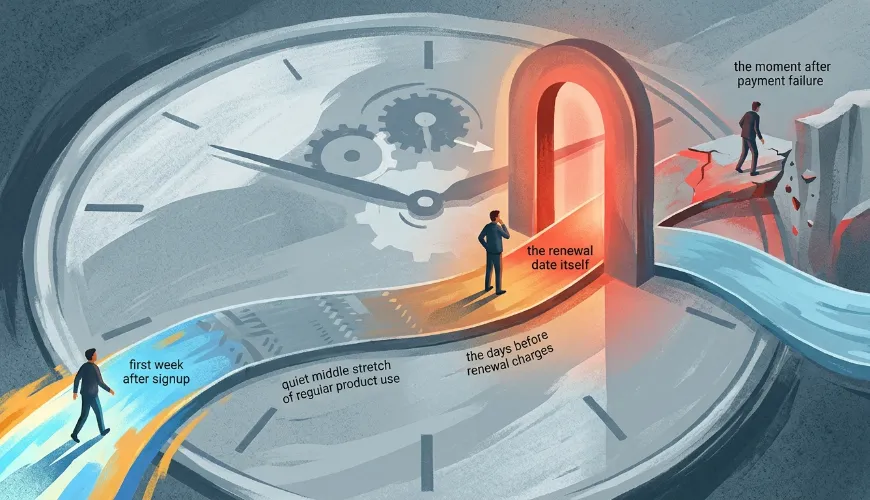
Churn gets decided at four moments: the first week after signup, the stretch of ordinary use that follows, the days before a renewal charge, and the minutes after a card declines. Each moment calls for a different email, a different tone and often a different owner on your team. Most brands write one generic reminder and hope for the best.
Why Renewal Day Is Too Late to Start
Retention emails run on data. A message that says "your plan renews in seven days" needs the renewal date, the plan, the price and ideally some usage history. If those facts live in three systems that don't talk to each other, your emails stay generic, and generic emails get ignored.
That's why the billing layer matters more than the email template. A subscription commerce platform that passes renewal dates, card failures and plan changes straight to your email tool lets you send messages triggered by what happened, rather than by a calendar guess. Brands that rebuild their lifecycle flows around those events often find the best sequences were possible all along; the data just wasn't reaching the inbox.
Email is also the cheapest place to do this work. In the State of Email 2025 survey of about 500 marketers, Litmus found that 35% earn $10 to $36 for every $1 spent on email, and another 30% earn $36 to $50. Those figures are attributed revenue, not proof that email caused every sale, so read them as directional. Even discounted heavily, retention email is hard to beat on cost.
Separate Voluntary From Involuntary Churn
Not every cancellation is a decision. Some customers choose to leave; others never meant to. The two groups need opposite treatment, and mixing them up wastes your best offers.
Recurly's 2026 churn benchmarks put median churn across industries at 3.60%, with 2.34% voluntary and 1.25% involuntary. SaaS sits at 3.22% and ecommerce at 4.25%. Involuntary churn is roughly a third of the total, which is a large slice for a problem that has nothing to do with whether customers like your product.
Voluntary churn is a value problem. These customers need reasons to stay: a recap of what they've used, a feature they haven't tried, an honest answer to why the price is what it is. Involuntary churn is a friction problem. A customer whose card expired doesn't need persuasion; they need a fast, clear way to fix it.
Here's the position worth taking: never send a discount to someone whose card simply failed. You train people to let payments lapse in exchange for a coupon, and you give away margin you didn't have to.
One limitation to keep in mind. Benchmarks blend products at very different price points, so your own split may differ. Tag your last twelve months of cancellations before you copy anyone's numbers.

Fix the First 30 Days Before You Write a Renewal Email
A renewal email can't rescue a customer who never got value in month one. Start with a three-message onboarding run: a welcome on day one that points to a single first action, a nudge on day three, and a check-in on day seven.
Day three is the one most teams skip. By then the novelty has faded and the customer is deciding whether this product fits into their routine. A short, specific message works best: one tip, one link, no feature tour. If they've already completed the first action, skip the nudge and send something that builds on it.
Trigger by behavior wherever you can. A customer who hasn't logged in by day five should get a different message than one who's logged in four times. Behavioral triggers take more setup than a fixed schedule, but they feel helpful rather than automated.
If you aren't sure where the silent stretches are, start with the journey itself. Our walkthrough of how Inventello Limited approached mapping the customer journey shows how to find messaging gaps before subscribers find them for you.
Build Renewal Reminders That Restate Value
A bare "you'll be charged tomorrow" email reminds people that they pay. That's all it does. For customers who've drifted, it's an invitation to cancel, and plenty accept.
Timing still matters, particularly on annual plans. Mailchimp's renewal email guidance suggests reminders 45 to 60 days out, then at 30 days, 7 to 10 days, and 1 to 3 days before expiry. That cadence was written for memberships, so adapt it. Annual subscribers can handle all four touches; monthly subscribers need only the last one or two, since a month goes by quickly.
What changes the outcome is what each reminder says. Lead with value, then the logistics:
-
Open with a usage recap: projects completed, orders shipped, hours saved, whatever your customer would recognize as a result.
-
Mention anything new since they signed up, especially features they asked for.
-
State the price and date plainly, and announce any increase well ahead of time. A surprise price change is the fastest route to an angry cancellation.
-
Make the next step obvious, whether that's changing the plan, pausing or leaving things as they are.
The recap is where most teams get lazy. Treat it as a piece of content rather than a data dump. Teams that apply sound content marketing strategies to these messages pick one result that matters to the reader and tell it in a sentence, instead of pasting a dashboard screenshot.
Subject lines can stay plain. "Your plan renews on March 3" and "Here's what you got done this year" both beat anything with an exclamation mark. Some regions require advance renewal notices, so confirm the rules before you finalize your schedule.
Recover Failed Payments Without Sounding Like a Collector
Failed payments are the quietest leak in a subscription business. The customer doesn't know, you don't hear about it, and the account simply lapses.
The fix is a short sequence, not a single email. Send three to five messages over one to two weeks, and write each one as though the customer is busy, not delinquent. The first should be matter-of-fact: the payment didn't go through, here's a link to update it. Later messages can add urgency, such as the date access will pause, without turning accusatory.
A few details make the difference:
-
Put a one-click update link in every message, ideally to a page that doesn't require a login.
-
Send a card-expiry notice before the card actually expires, since it prevents the failure in the first place.
-
Keep the tone neutral. "We couldn't process your payment" beats "Your payment is overdue."
-
Stop the sequence the moment payment succeeds.
Recovery works. Recurly's 2024 State of Subscriptions report says the company saved 72% of at-risk subscribers through recovery events. That's a vendor figure from its own network, so treat it as a ceiling rather than a promise. Still, even a modest save rate pays off quickly when involuntary churn makes up a third of your losses. For a deeper look at sequencing, see our guide to recovering failed payments with dunning emails.
Measure What the Emails Actually Change
Open rates will tell you very little here. Track the numbers that connect to revenue: involuntary churn rate, recovered revenue per month and renewal rate by signup cohort. Cohorts matter because they show whether a change to your onboarding flow improved renewals a year later, which a monthly average will bury.
To know whether the emails themselves work, hold some customers out. Keep a small group, say 10% of renewing accounts, on the old flow or no reminder at all, and compare renewal rates after a full cycle. It's slower than watching a dashboard, but it's the only way to separate the effect of your emails from customers who would have renewed anyway. Our piece on testing whether a campaign lifted sales covers the same logic for one-off sends.
Start at Day One
Renewal is the last email in a sequence, not the first. If the onboarding was silent, the value emails were generic and the payment notices were cold, a clever renewal subject line won't save the account.
Pick one gap this month. Fix day three, rewrite the pre-renewal reminder around a usage recap, or add a fourth dunning touch. Then measure it against a holdout and move to the next. Small, tested changes at the right moments will do more for churn than any single campaign.