Turn Existing Pictures Into Practical Creative Assets
By SendBridge Team · Published Sep 02, 2026 · 10 min read · Marketing
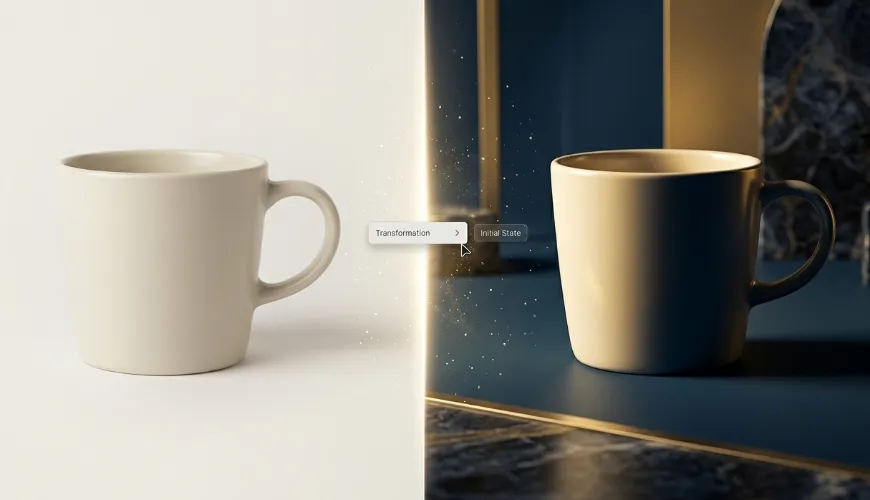
Most AI image tools still ask users to begin from an empty prompt box, which sounds powerful until you actually need control. A product photo, a portrait, a sketch, or a social post draft already contains decisions about subject, framing, color, and mood. Starting over from text alone can waste that foundation. That is where Image to Image becomes useful: it gives creators a way to upload an existing visual, describe the change they want, and let AI reinterpret the image instead of inventing everything from scratch.
From a practical user perspective, this workflow feels closer to creative direction than random generation. You are not only asking for "a beautiful image." You are giving the system a source picture and then steering it toward a new style, scene, or visual purpose. Tools in this category, including Toimage AI, are typically positioned as image-to-image generators and editors that can transform photos, adjust quality, reinterpret visuals, and in some cases extend into image-to-video workflows through supported video models. The underlying idea is straightforward: turning something you already have into a different version of itself.
Why Source Images Make AI Creation More Controllable
One reason to consider this kind of workflow is simple: an uploaded image gives the AI a starting structure. Instead of relying only on words, the tool can read the existing composition, subject, and general visual direction before applying the user's prompt.
This matters for creators who need usable results, not just surprising ones. A marketer may want several ad-style versions of the same product photo. A designer may want to test a sketch in different visual styles. A casual user may want to make a portrait feel cinematic, illustrated, or more polished without learning complex editing software. In all of these cases, the original image reduces the gap between intention and result.
The Workflow Begins With Visual Evidence
Image-to-image tools tend to be most useful when the user already has a visual idea but needs faster iteration. The uploaded image works like evidence: it tells the system what the subject looks like, where the main elements are, and what kind of image is being transformed.
Prompts Still Shape The Final Direction
A source image does not remove the need for good prompting. It simply gives the prompt a stronger foundation. If the instruction is vague, the result may still drift. If the instruction is specific but realistic, the output usually has a better chance of matching the user's intended direction.
How An Image-to-Image Workflow Typically Works
The AI Image to Image experience offered by Toimage AI follows the pattern common to most tools in this space: an upload-and-generate process where users provide an image, add a text instruction, and generate a new version based on that combination.
Platforms in this category often offer access to multiple AI models. Toimage AI, for example, references models such as Nano Banana and Grok on its image page, and points to image-to-video capabilities through models such as Veo 3. That does not mean every model behaves identically or produces equivalent results. The more accurate framing is that these platforms group different model options into one interface, which can be convenient but also means output quality depends heavily on which model is used for which task.
Upload A Clear Starting Image
The first step is to provide a source image. This can be a photo, design draft, product visual, character concept, or other image that gives the system something concrete to transform.
Clear Inputs Usually Produce Better Outputs
A clean and readable image is more likely to give the AI useful information. If the subject is hidden, blurred, poorly lit, or visually crowded, the generated result may become less predictable. This is a normal limitation of image-based AI workflows in general, not something specific to any single platform.
Describe The Desired Visual Change
The second step is to write a prompt that explains what should change. The prompt can describe style, mood, background, lighting, composition, or the kind of final image the user wants.
Specific Instructions Reduce Random Results
A useful prompt does not need to be long, but it should be directional. "Make it better" is weak. "Turn this product photo into a clean studio-style social media image with soft lighting and a minimal background" gives the system a clearer task.
Generate A Reimagined Version
The third step is generation. The platform uses the source image and text instruction to produce a new visual result, which may reinterpret the original image through a different style, quality level, or creative scene.
Results May Need Several Iterations
A realistic expectation for any Image to Image AI workflow is iteration. One generation may be good enough, but complex edits, identity-sensitive portraits, detailed product visuals, or unusual styles often need several attempts with refined wording. This is true across most tools in this category, not unique to any one product.
Extend Images Toward Video When Needed
Some platforms also offer image-to-video features as a fourth, optional step, allowing users to animate still images through supported video models.
Video Claims Should Stay Practical
Image-to-video should be understood as an extension of the image workflow, not a substitute for professional video production. Motion quality, realism, and consistency vary significantly depending on the image, prompt, model behavior, and complexity of the requested movement. Marketing claims around AI video features often outpace what the tools reliably deliver.

Where Image-to-Image Tools Fit Real Creative Work
These tools are not a replacement for every design workflow. A more honest framing is that they help users move faster from one visual idea to several possible directions. For creators who already have a source image, image-to-image generation can act as a quick visual testing layer between raw material and final production.
For example, an ecommerce seller can test how a product might look in different environments before committing to a shoot. A content creator can turn a basic portrait into a more polished thumbnail concept. A designer can upload a draft image and explore multiple style directions. Someone working on a personal or gift project may want a photo to painting result instead, where the goal is an artistic rendering rather than a photographic one. A brand team can use the same original image to compare campaign moods, from clean editorial visuals to more cinematic or playful concepts. Beyond static images, you can also scale your video output by using an AI TikTok Shop video maker to generate multiple TikTok Shop video variations for your product testing campaigns.
It Works Best For Iteration And Direction
The practical value is speed. Image-to-image workflows tend to be strongest when the user wants to explore visual directions quickly, not when they expect one prompt to deliver a perfect final asset on the first try.
Human Judgment Still Decides The Best Result
AI can generate options, but it cannot fully understand brand taste, legal context, audience expectations, or product accuracy on its own. The user still needs to review results carefully, especially for commercial images, portraits, text inside images, and brand-sensitive visuals.
A Clear Comparison For Everyday Users
This kind of platform is easiest to evaluate when compared with common creative routes. It sits between manual editing software, pure text-to-image generation, and single-purpose AI filters.
| Comparison Area | Image-to-Image Workflow | Traditional Editing Software | Pure Text-To-Image Tools |
|---|---|---|---|
| Starting point | Existing image plus prompt | Existing file and manual edits | Text prompt only |
| Learning cost | Relatively low | Often higher | Low, but less visual control |
| Creative control | Guided by source image and text | High but time-consuming | Heavily dependent on prompt |
| Best use case | Reimagining photos and drafts | Precise professional editing | Creating new concepts from scratch |
| Iteration speed | Fast for visual exploration | Slower for non-experts | Fast but sometimes unpredictable |
| Output consistency | May vary by prompt and model | Controlled by user skill | Can vary widely |
This comparison is not meant to argue that one method wins in every situation. Traditional software still matters when precision is required. Text-to-image tools are still useful when there is no starting visual. Image-to-image tools become more relevant when the user already has an image and wants controlled creative variation without building everything manually. Photographers often face similar choices when deciding between Imagen Culling vs Narrative Select to streamline their post-production workflow and improve overall efficiency.
Realistic Strengths And Honest Limitations
The main strength of image-to-image workflows is that the existing image becomes part of the prompt. That makes it easier to preserve some visual direction while exploring new looks. It also reduces the intimidation factor for users who do not know how to write long technical prompts from scratch.
At the same time, the limitations are real. Prompt quality affects the result. Complex scenes can confuse the model. Fine details may shift between generations. Faces, hands, text, logos, and product-specific features often require careful checking. If the user asks for too many changes at once, the result may become visually impressive but less faithful to the original intention. These constraints apply broadly across image AI tools today.
Commercial Use Needs Careful Review
Image-to-image tools can support commercial creative work, but generated assets should still be reviewed before use. Marketing pages for these platforms often present commercial-oriented value, but users should avoid assuming that every output is automatically suitable for every legal, brand, or advertising context. Licensing terms, model training data, and rights to generated outputs vary between providers and deserve direct review.
AI Output Should Not Replace Verification
For product images, the final visual should match the real product. For portraits, the result should be checked for identity drift. For branded content, any visible text or logo should be inspected. These checks are part of responsible production, not optional polish.
Why This Workflow Feels More Relevant In 2026
AI image creation has moved beyond novelty. The question is no longer whether AI can make impressive pictures. The question is whether it can help people produce usable visuals faster, with less friction and more control. Image-to-image tools fit that shift because they start from the material users already have.
For creators, marketers, and small teams, that difference matters. A source image gives the process direction. A prompt gives it intent. Multiple model-backed generation options give it range. The result is not a perfect automatic design department, but it can be a practical creative assistant for testing, transforming, and expanding visual ideas - provided the user keeps expectations grounded.
The most honest way to understand image-to-image generation is this: it helps bridge the gap between a raw image and a more developed creative asset. When used with clear inputs, specific prompts, and realistic expectations, it can make image transformation feel less like gambling with AI and more like directing a visual draft toward a usable result. Whether a specific tool - Toimage AI or any of its competitors - is the right fit depends on the user's workflow, the model options that matter to them, and how the output holds up under their own testing.