5 AI Product Image Workflows for E-Commerce Brands Without a Studio
By SendBridge Team · Published Oct 26, 2026 · 6 min read · Marketing
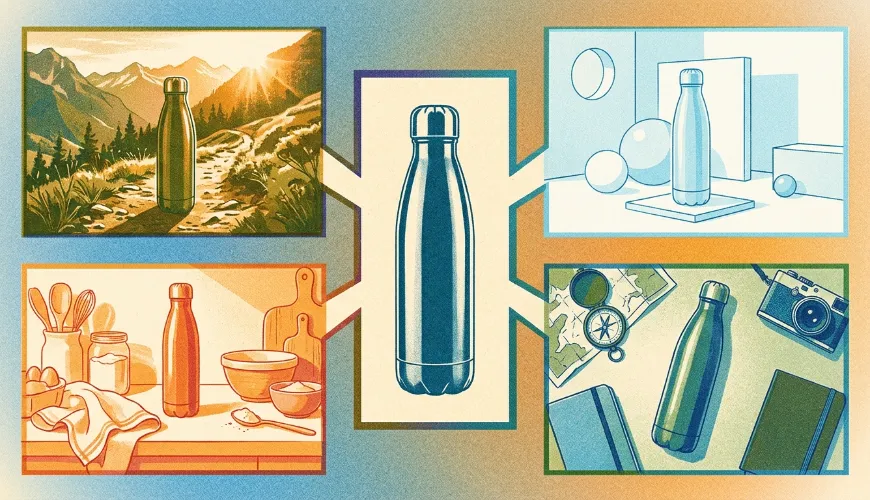
Small e-commerce teams often have a few product photos and many different visuals to prepare. With the right workflow, those existing assets can become lifestyle scenes, product staging images, flat lays, listing visuals, and campaign graphics. This article covers five practical ways to create AI images for your products without renting a studio or planning a full photo shoot.
1. Turn Plain Product Photos into Lifestyle Images
A clean product photo is useful for a product page. It may feel limited when you need social posts, ads, or campaign banners.
With AI, you can place the product in a setting that matches its audience and use case. A coffee maker can appear in a bright kitchen. A moisturizer can sit beside a sink with soft light. A backpack can be shown on a hiking trail or beside travel gear.
Start with creating a clear product photo. Add the setting, mood, lighting, and composition you want. For example:
Place this insulated water bottle on a wooden bench beside hiking equipment, with warm afternoon sunlight and a natural outdoor setting.
This gives AI a visual direction for a campaign or social post. Check the final image carefully to make sure the main details remain accurate.
2. Adapt One Product Image for Multiple Campaigns
A single product image may need to work across several platforms. Social posts, display ads, email banners, and seasonal promotions often use different dimensions and visual styles.
AI can help adapt the same source image for each campaign direction. You can create AI images with a different background, crop, color mood, props, or setting while keeping the product as the main subject.
For example, a sneaker brand could use one product photo to:
-
Create a clean white image for the product page
-
Add filters or templates for social media post
-
Make a close-up detail image for an email
-
Create a bold color composition for a launch poster
-
Design a seasonal setting for a limited-time campaign
This workflow is useful when a team needs more creative options from existing assets. Pollo AI brings product visual workflows together with campaign-focused tools, giving sellers a place to create and refine these variations.
Each version should have a clear purpose. One image can focus on product details, while another can show the product in context. Clear roles help the campaign feel organized.

3. Create Product Staging Scenes
Product staging focuses on how an item is arranged with supporting objects. This is useful for products that need context, such as candles, cosmetics, jewelry, kitchen tools, and home accessories.
A seller may have a product cutout or a basic front-facing photo. AI can help build a more complete scene around it. You can describe the surface, props, background, lighting, and overall style.
Imagine a handmade candle brand preparing images for a seasonal collection. The team could create a scene with the candle on a dark wooden table, surrounded by dried flowers and soft evening light. The same product could also appear in a clean white setting for a minimalist product page.
The input is usually a product image and a creative direction. The output can support:
- Social media posts
- Product launch pages
- Seasonal promotions
- Email banners
- Brand mood boards
Pollo AI includes product-focused workflows that help organize this process. You can start with the asset you already have and develop different visual settings around it.
4. Generate Flat Lay Product Images
Flat lay images show products from above. They work well for clothing, accessories, stationery, beauty products, food, and gift sets.
Creating a good flat lay by hand requires space, props, lighting, and careful arrangement. Every item needs to be positioned correctly, and several versions may require repeated setup.
AI can help you explore these arrangements more quickly. You can describe the layout, background, supporting objects, and color palette. You can also request space for text if the image will be used in a social post or promotional graphic.
For example:
Arrange this skincare set in a clean flat lay on a pale stone surface, with green leaves, folded white fabric, and soft natural light. Leave open space at the top for a headline.
This type of image can give a product collection a more polished presentation. It also helps a small team create visual variety when the original product shoot produced only a few basic photos.
Review the placement of every product after generation. Set images often contain several small objects, so details can shift during the process.
5. Build a Listing Image Set from Existing Assets
Online stores often need several product images for one listing. A typical set may include a main product image, close-up details, a lifestyle image, a size reference, and a feature-focused graphic.
Creating each image separately can lead to inconsistent backgrounds, colors, and product proportions. A workflow-based approach gives the team a clearer structure.
Start with the existing product photos and decide what each image needs to communicate. One image can show the product clearly against a simple background. Another can show the item in use. A third can highlight a material, texture, feature, or included accessory.
For a desk lamp, the set might include:
- A clean product image on a neutral background
- A close-up of the lamp head and controls
- A desk scene showing the lamp in use
- A size reference beside common desk objects
- A feature graphic showing adjustable brightness
This structure gives shoppers more information as they move through the listing. AI can help create early versions of the set and reduce the need for repeated photography.
Every image should go through a product accuracy check. Compare the generated visuals with the real item before publishing them.
Use AI to Extend Your Product Assets
AI product image workflows can help e-commerce teams create more visual content from the materials they already have. Product staging adds context. Flat lays improve presentation. Listing image sets organize information. Campaign variations give teams more directions to test.
The process still needs human review. Check product details, packaging, colors, labels, proportions, and any text before an image goes live. AI can reduce production time while the team remains responsible for the final asset.
Ready to create more product visuals from a few existing photos? Try Pollo AI and explore its product image workflows for campaign-ready creative.