Best Transactional Email API Providers for Deliverability [2026]
![Best Transactional Email API Providers for Deliverability [2026]](https://sendbridge.com/images/blog/2026/03/best-transactional-email-api-providers-for-deliverability-2026-1772385396596.webp)
We Compared Best Transactional Email API Providers for Deliverability in 2026
What happens when a password reset email lands in spam? Your user locks themselves out, your support queue grows, and trust takes a hit. Transactional emails like order confirmations, 2FA codes, and shipping notifications are the messages users actively wait for. That makes inbox placement rate the single most important metric when choosing a transactional email API provider.
We compare Mailtrap, Mailgun, Amazon SES, and SendGrid across inbox placement testing, SPF/DKIM/DMARC authentication, bounce suppression, dedicated IP warm-up, and deliverability analytics.
What makes a transactional email API provider “good” for deliverability?
Before diving into individual providers, it helps to understand what separates a deliverability-focused email API from a generic sending service.
- Email authentication support. The provider should make it straightforward to configure SPF, DKIM, and DMARC, the three authentication protocols that mailbox providers like Gmail, Outlook, and Yahoo use to verify your identity. Ideally, the platform automates or validates this configuration for you.
- Dedicated IP options. Are dedicated IPs available, and does the provider offer guided IP warm-up? Shared IP pools work for low-volume senders, but at scale, a dedicated IP address gives full control over sender reputation. Look for providers with structured warm-up schedules that gradually increase sending volume over 2 to 4 weeks.
- Bounce and complaint handling. Automatic suppression of hard bounces and spam complaints is essential. Without it, you risk damaging your sender reputation by repeatedly hitting invalid or unengaged addresses.
- Sending infrastructure and reputation. The provider’s own IP pools, uptime guarantees, and infrastructure redundancy all affect whether your emails get through. A 99.99% uptime SLA means something very different from a vague “high reliability” claim.
- Deliverability analytics. You need more than open rates. Look for inbox placement tracking, drill-down reports by mailbox providers, spam complaint rates, and real-time alerts that let you catch problems before they snowball.
Mailtrap
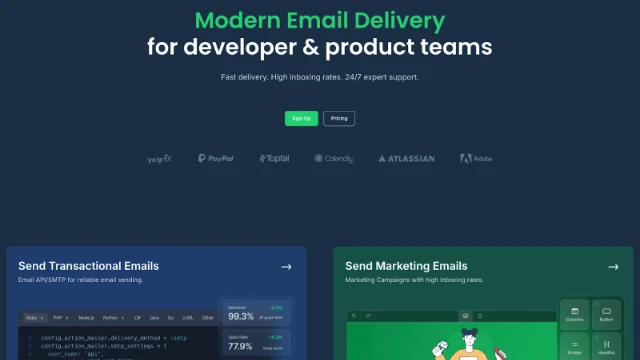
Mailtrap is a modern email platform for developer and product teams that need reliable transactional sending. It provides an email API service built around high inbox placement, actionable analytics, and a developer experience that gets you sending in minutes.
Mailtrap is trusted by companies like PayPal, Atlassian, Adobe, and Yelp. It is ISO 27001 and SOC 2 Type II certified and GDPR compliant across all plans.
Deliverability features
In independent inbox placement tests, Mailtrap achieved a 78.8% inbox delivery rate, with only 14.4% landing in spam and 4.8% sorted into tabs. These results were measured on a shared IP with no domain warm-up, which provides a realistic baseline of what new senders can expect out of the gate.
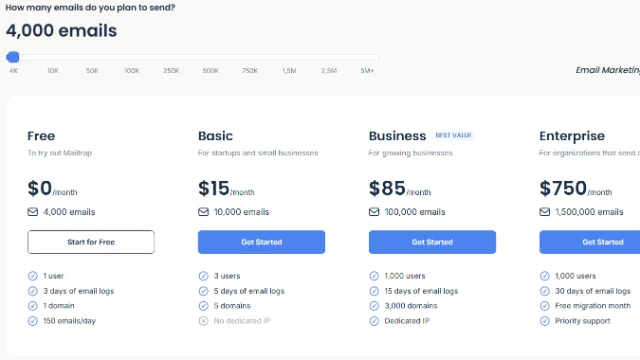
Mailtrap supports automatic configuration and validation of SPF, DKIM, and DMARC. Dedicated IPs are available on higher-tier plans, along with a guided warm-up process to build sender reputation gradually.
A standout feature is the separation of dedicated email streams for transactional and bulk emails. By keeping these traffic types on separate streams, Mailtrap helps ensure that marketing sends don’t drag down the deliverability of your critical transactional messages.
Mailtrap provides 30-day email history with helicopter-view dashboards and drill-down reports that can be filtered by email category, mailbox provider, domain, and stream. You get real-time tracking of opens, clicks, bounces, and spam complaints, with webhooks for event-driven workflows.
API and developer experience
Mailtrap provides a RESTful API and SMTP relay, with official SDKs for Node.js, Ruby, PHP, Python, Elixir, and Java. The platform also offers 25+ ready-to-use code snippets for common frameworks, making integration fast. In hands-on testing, setup from SDK installation to first successful send took approximately five minutes.
The documentation is practical and well-balanced, with video guides, deliverability tips, and immediately applicable examples. Mailtrap also provides an official MCP (Model Context Protocol) server for AI-assisted email management, and supports transactional email templates built on the Handlebars engine.
Pricing
Mailgun
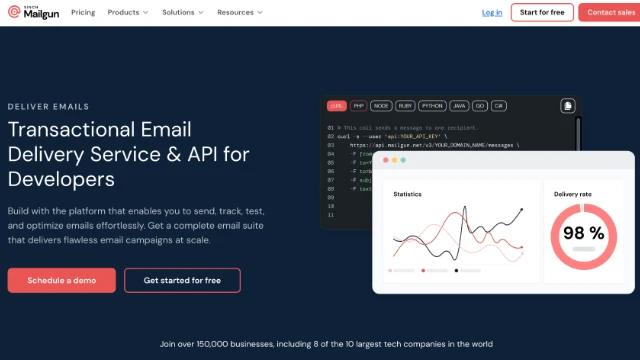
Mailgun is a transactional email API provider, built for developer teams that need granular control over their sending infrastructure. The platform supports advanced use cases like recipient variables, inbound email routing, email validation, and template management. Mailgun's infrastructure runs on Google Cloud, which gives it strong scalability and a 99.99% uptime guarantee.
Deliverability features
In the same independent deliverability test, Mailgun achieved a 71.4% inbox placement rate, with 23.8% of emails landing in spam and 3.8% in tabs. While solid, the higher spam rate compared to some competitors is worth noting for senders with strict inbox placement requirements.
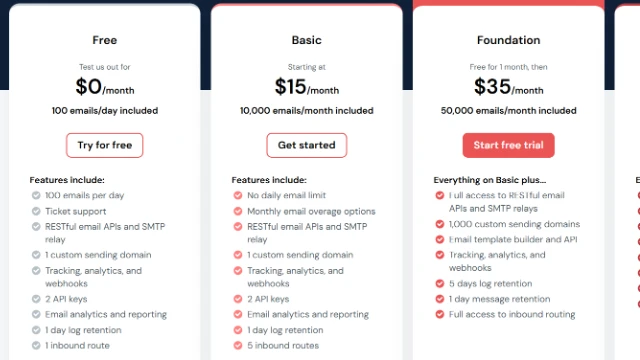
Mailgun supports SPF, DKIM, and DMARC authentication, with DNS configuration required during domain verification. Dedicated IPs are available, though they come at a premium of $59/month each. The platform keeps email logs for up to 30 days (depending on your plan tier), with filtering by event type, list name, and tag names.
For advanced deliverability tooling, Mailgun offers its Optimize suite as a paid add-on. This includes inbox placement testing, email previews, and deliverability analytics. The separate Validate product provides email list verification to help you weed out invalid addresses before sending.
API and developer experience
Mailgun offers both a RESTful API and SMTP relay. SDKs are available for Go, Node.js, PHP, Java, Ruby, and Python. Authentication uses API key via HTTP Basic Auth, with support for domain-specific API keys. In hands-on testing, setup took 10 to 15 minutes, largely due to the DNS configuration step.
The documentation is comprehensive with code examples in multiple languages, though navigation can be challenging and some sections reference older patterns.
Pricing
Amazon SES
 Amazon Simple Email Service (SES) is a high-performance, pay-as-you-go email delivery service that supports transactional email via API and SMTP. It is stripped down by design, offering raw sending infrastructure at rock-bottom pricing for teams that are comfortable managing their own deliverability. As part of the AWS ecosystem, it integrates natively with Lambda, S3, CloudWatch, SNS, and other AWS services.
Deliverability features
Amazon SES delivered a 77.1% inbox placement rate in independent testing, with 20.0% going to spam and 1.9% to tabs. While the initial cost is minimal, that 20% spam rate means your team will need to invest heavy engineering effort into deliverability optimization.
SES supports SPF and Easy DKIM for authentication, along with DMARC. Dedicated IPs are available as an add-on. However, the platform requires you to handle much of the deliverability management yourself. Bounce and complaint notifications are delivered via Amazon SNS, and you need to build your own suppression logic on top of the account-level suppression list.
AWS offers a Virtual Deliverability Manager (VDM) as an additional paid feature. It provides dashboard-level visibility into deliverability metrics and recommendations. But without VDM, Amazon SES offers relatively basic monitoring: a reputation dashboard tracking bounce and complaint rates, but nothing close to the drill-down analytics offered by dedicated email platforms.
New SES accounts start in sandbox mode, which restricts sending to verified addresses only. Moving to production requires a request to AWS, which can add time to your onboarding.
API and developer experience
SES integrates through the AWS SDK, available for all major languages. An SMTP interface is also available. Setup took 15 to 20 minutes in hands-on testing, with the bulk of that time spent on IAM permissions configuration and sandbox-to-production migration.
AWS documentation is extremely comprehensive but complex. Developers without prior AWS experience may struggle with IAM concepts and SES-specific configuration.
Pricing
Amazon SES is the cheapest option in this comparison at $0.10 per 1,000 emails. There is no monthly minimum; you pay only for what you send.
SendGrid
SendGrid is an email platform that supports both transactional and marketing email from a single platform. It offers dedicated IPs with automated warm-up, Handlebars-based dynamic templates, and subuser management for teams. This makes it a common choice for enterprises and larger organizations.
Deliverability features
SendGrid’s deliverability numbers were the lowest in independent testing: a 61% inbox placement rate, with 17.1% in spam and a notable 20.9% missing entirely.
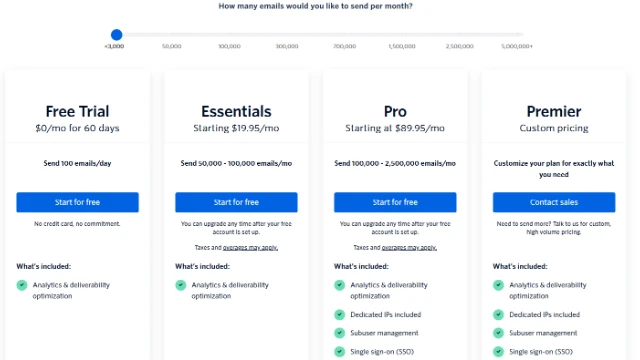
SendGrid does support SPF, DKIM, DMARC, and link branding for authentication. Dedicated IPs with automated warm-up are available on the Pro plan and above. The platform provides a sender authentication wizard that guides DNS setup, making the initial configuration fairly straightforward.
The Deliverability Insights dashboard, which includes inbox placement data, engagement metrics, and reputation monitoring, is locked behind the Pro plan ($89.95/month). Lower-tier plans get basic analytics only. Expert deliverability consulting services are also available as a paid add-on. SendGrid handles bounce and spam complaint suppression automatically.
API and developer experience
SendGrid offers a RESTful API and SMTP relay with official SDKs for Python, Go, Node.js, Ruby, PHP, Java, and C#. Setup takes approximately from 10 to 15 minutes, with some added complexity around sender authentication and API key management.
Documentation is comprehensive but can be confusing, with legacy content for different API versions mixed in. The large community and extensive third-party resources partially compensate for this.
Pricing
Head-to-head comparison
Here's a side-by-side look at Mailtrap, Mailgun, Amazon SES, and SendGrid across the metrics that matter most for transactional email deliverability.
| Feature | Mailtrap | Mailgun | Amazon SES | SendGrid |
|---|---|---|---|---|
| Inbox Placement | 78.8% | 71.4% | 77.1% | 61.0% |
| Dedicated IP | ✓ | ✓ ($59/mo) | ✓ (add-on) | ✓ (Pro+) |
| Automated IP Warm-Up | ✓ | ✓ | ❌Manual | ✓ |
| SPF/DKIM/DMARC | ✓ Auto | ✓ | ✓ | ✓ |
| Analytics | Included | Add-on (Optimize) | Add-on (VDM) | Pro+ only |
| Uptime SLA | 99.99% | 99.99% | AWS regional | 99.9% |
| Setup Time | ~5 min | ~10 to 15 min | ~15 to 20 min | ~10 to 15 min |
| Free Tier | 4,000/mo | 100/day | 3,000/mo (12 mo) | 100/day, 60-day trial |
| Starting Price | $15/mo | $15/mo | $0.10/1K emails | $19.95/mo |
| SDKs | Node.js, Ruby, PHP, Python, Elixir, Java | Go, Node.js, PHP, Java, Ruby, Python | AWS SDKs | Python, Go, Node.js, Ruby, PHP, Java, C# |
How to choose the right provider for your deliverability needs
Each of these four providers targets a different sweet spot. Here’s how to match your priorities to the right platform:
If high email deliverability is your top priority, choose Mailtrap. It’s the only provider in this comparison that includes comprehensive deliverability analytics on all plans with no add-ons required. Separate sending streams for transactional and bulk email, automatic authentication configuration, and drill-down reports by Mailtrap give you full control over inbox placement from day one.
If you need the lowest cost per email at high volume, choose Amazon SES. At $0.10 per 1,000 emails with no monthly minimum, nothing else comes close on price. But budget for the engineering time needed to build and manage your own deliverability tooling, suppression logic, and analytics.
If you want granular infrastructure control and email validation, choose Mailgun. Its detailed email logs, domain-specific API keys, and validation API give developer teams the fine-grained control they want. Just factor in the cost of the Optimize add-on if you need inbox placement testing.
If you need transactional and marketing email from one tool, choose SendGrid. It has a big ecosystem and a unified platform for all email types. Just be aware that deliverability insights and dedicated IPs require the Pro plan, and that independent testing has flagged inconsistent inbox placement.
Beyond the provider itself, consider your team’s technical depth, your existing infrastructure (especially if you’re already on AWS), your sending volume projections, and whether you need marketing email capabilities alongside transactional.
FAQ
What is the difference between a transactional email API and an SMTP relay?
A transactional email API is a REST-based interface that lets you send emails programmatically with additional capabilities like template management, analytics, and webhook tracking.
An SMTP relay works differently: your application connects to the provider's SMTP server using credentials, and the provider handles the actual delivery. It's the same protocol your email client uses, just routed through the provider's infrastructure instead of your own mail server.
All providers in this comparison offer both options so you can choose based on your integration needs.
Why do inbox placement rates differ so much between email API providers?
Inbox placement depends on several factors: the provider's shared IP pool reputation, how strictly they enforce sender standards, their authentication configuration (SPF, DKIM, DMARC), and how they handle bounce suppression.
Providers that separate transactional and bulk email streams and auto-suppress spam complaints tend to maintain higher inbox placement rates because their IP pools stay cleaner.
Do I need a dedicated IP address for transactional email?
Not necessarily. Shared IPs work well for lower-volume senders because the provider manages the pool reputation. However, once you're sending at higher volumes, a dedicated IP gives you full control over your sender reputation since it's not affected by other senders' behavior. If you go with a dedicated IP, make sure your provider offers a guided warm-up process to build reputation gradually over 2 to 4 weeks.