Everything You Need to Know About Email Aliases
By SendBridge Team · Published Feb 14, 2026 · 10 min read · Email Deliverability
Understanding Email Aliases: Simplifying Digital Communication
In the ever-evolving world of digital communications, the concept of an email alias stands out as a practical tool for both personal and professional users. But what is an email alias, and why has it become such a crucial feature for managing inboxes, improving privacy, and boosting productivity? This article will dive deep into the definition, benefits, setup, practical examples, and frequently asked questions about email aliases. By the end, navigating the world of aliases will seem effortless, and you’ll be ready to optimize your email experience.
What is an Email Alias?
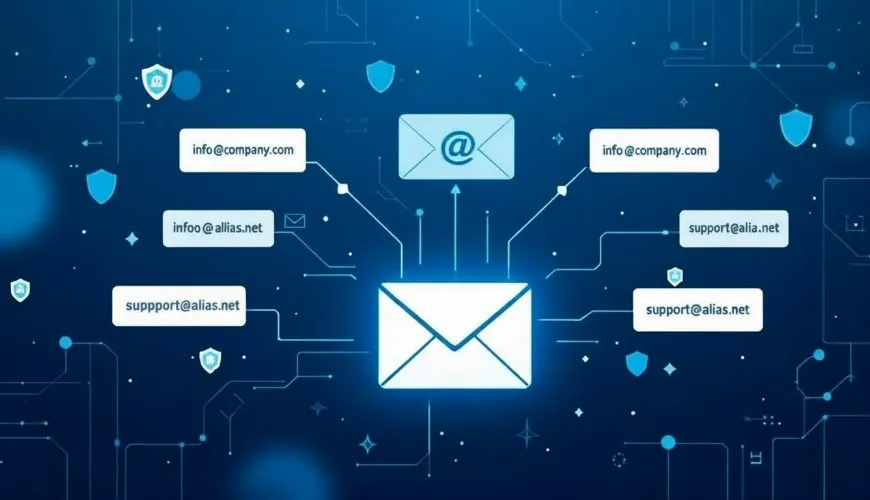
An email alias is an alternative email address that forwards messages to a primary inbox, allowing users to send and receive emails without revealing or using their main email address. Unlike creating a new email account, an alias does not require a separate login or mailbox. Essentially, it acts as a mask or secondary identity for your actual email address.
Think of it as a digital nickname: you can provide different aliases for different contexts-such as shopping, newsletters, work projects, or personal communication-while managing all correspondence from a single inbox.
Real-World Example
Consider a freelance web designer named Dana. To keep her professional and personal emails separate, Dana creates multiple aliases:
- design@herdomain.com for client communications
- newsletter@herdomain.com for industry subscriptions
- orders@herdomain.com for online purchases
All emails sent to these addresses land in Dana’s primary inbox, but she can quickly filter, search, or organize them based on the alias used. This system helps her maintain privacy, reduce inbox clutter, and stay organized without needing to check multiple accounts.
Why Use Email Aliases?
The flexibility and convenience of email aliases make them indispensable for many users. Here are some of the most compelling reasons:
1. Enhanced Privacy
When signing up for online services, making purchases, or joining newsletters, sharing your main email address can expose you to spam or data breaches. By using an alias, you shield your primary identity. If you notice unwanted emails or spam coming to a specific alias, you can simply delete or disable that alias-instantly cutting off the source without affecting your main account. For even greater privacy when signing up for new services, you might consider using a free email without phone number to keep your personal contact details completely separate.
2. Improved Organization
Aliases act like built-in labels or categories. For businesses managing multiple departments (e.g., support@, sales@, info@), aliases can route messages to relevant team members or filter them into folders automatically. Even for individuals, aliases help distinguish personal, professional, and promotional emails, which can make inbox management significantly more efficient.
3. Simplified Communication
For companies and organizations, aliases let teams receive messages under a unified address (like help@company.com) while distributing them to several back-end users. This streamlines support, sales inquiries, and other group communications.
4. Spam and Threat Mitigation
If an alias starts receiving unwanted or suspicious emails, it can be deactivated-an effective tactic for spam prevention. This containment strategy often proves quicker and more effective than creating a new primary email account.
5. Cost-Effective and Scalable
Most email service providers allow a generous number of aliases for each user, often at no additional cost. For businesses, this means growing teams and evolving needs can be accommodated without paying for extra mailboxes.
How to Set Up an Email Alias: Tutorials for Popular Platforms
Different email services offer varying methods for creating and managing aliases. Below are simple tutorials for the most widely used platforms.
Gmail
Gmail does not support traditional aliases, but offers two robust alternatives:
- Plus Addressing: Add "+alias" before the "@" in your Gmail address. For instance, messages sent to johndoe+shopping@gmail.com will arrive in johndoe@gmail.com’s inbox.
- Custom Domains with Google Workspace: With a custom domain, create aliases (like info@yourdomain.com) that forward to your main account. Set up via the Google Workspace admin console.
Example:
johndoe@gmail.com → johndoe+newsletter@gmail.comWhile both addresses deliver to the same inbox, filters can automatically label or sort emails sent to the alias.
Microsoft Outlook
Outlook (via Outlook.com or Microsoft 365) allows you to create aliases linked to the same account.
- Log in to your Microsoft account.
- Go to Account Settings > Your Info > Manage how you sign in.
- Select "Add email" and enter the desired alias.
- Choose whether you want it as a new Outlook address or link an existing one.
Emails sent to either address arrive in your main inbox. You can send messages "from" an alias as well.
Apple iCloud Mail
Apple’s iCloud Mail supports up to three active aliases per account.
- Sign in to iCloud Mail.
- Click the gear icon and choose Preferences.
- Under Accounts, select "Add an alias."
- Configure the alias name, label, and color.
Messages to your alias will appear in your iCloud inbox, and you can reply from the alias address.
Custom Domains (cPanel, Zoho, etc.)
Most custom domain email hosts (like cPanel, Zoho, or Fastmail) allow unlimited aliases.
- Navigate to your domain control panel.
- Locate the email or "Forwarders" section.
- Add a new alias or forwarder, specifying the destination (your real inbox).
With this setup, companies can create aliases for different departments or campaigns with ease.
FAQ: Common Questions About Email Aliases
Q: Do email aliases have separate inboxes?
No. Aliases forward all mail to your primary account, so you manage everything from a single inbox.
Q: Can I send emails from an alias?
On most platforms, you can set the "From" address to your alias when composing a message, though some services may require extra setup or verification.
Q: Are aliases secure?
Aliases offer strong privacy benefits, especially when used for one-time signups or online purchases. However, they are only as secure as your main account. Always enable two-factor authentication and use strong passwords.
Q: Can I delete an alias if I no longer need it?
Yes. Most providers let you disable or delete aliases at any time, instantly stopping any emails sent to that address.
Q: How many aliases can I create?
Limits vary by provider: Gmail (unlimited plus addressing), Microsoft (up to 10), iCloud (up to 3), and custom domains (often unlimited).
Q: Are there downsides to using aliases?
Rarely, but some online services may not recognize plus addressing or may block signups using aliases. Additionally, if an alias is compromised, you’ll need to update any accounts using that address.
Real-World Application: Email Aliases in Action
Reflecting on how email aliases empower both individuals and organizations, it becomes clear that their utility extends far beyond simple masking of an address. Take the example of a small online retailer using aliases for customer support (support@shop.com), order notifications (orders@shop.com), and marketing campaigns (offers@shop.com). Not only does this keep incoming messages separate and manageable, but it also projects a professional image to customers.
Meanwhile, savvy internet users often employ aliases to sign up for newsletters or freebies. If a particular service starts spamming, the alias can be terminated-no need to change your primary address or notify your contacts. This kind of control is invaluable in a world where inboxes are constantly bombarded by unwanted messages.
Best Practices for Managing Email Aliases
Setting up aliases is just the beginning. To maximize their benefits:
- Use descriptive aliases: Make it easy to identify the purpose (e.g., finance@, marketing@, jobs@).
- Set up filters and rules: Automatically sort or label incoming messages by alias for cleaner inbox management.
- Monitor and prune aliases: Regularly review which aliases are active and remove ones that attract spam or are no longer needed.
- Keep aliases secure: Ensure your main account is protected with strong authentication measures, as all aliases ultimately point there.
Email Aliases and Deliverability
An often-overlooked aspect of aliases is their impact on email deliverability-the likelihood that your email will reach the recipient’s inbox instead of being flagged as spam. When sending marketing or transactional emails from an alias, it’s vital to maintain a good sender reputation and avoid practices that could trigger spam filters. For bulk email campaigns or automated workflows, reputable platforms such as SendBridge provide robust tools for email verification, SMTP testing, and deliverability optimization.

For additional reading on topics like this, see the article on email deliverability, where best practices and pitfalls are explored, or explore how email marketing strategies intersect with inbox management in this comprehensive guide.
Personal Perspective: The Power of Simplicity
Sometimes, the most effective digital tools are also the simplest. Email aliases, despite their straightforward nature, offer remarkable solutions to increasingly complex online communication challenges. They provide the flexibility to adapt to new tasks, protect privacy on the fly, and organize digital correspondence as life and business demands change. It’s not an exaggeration to say that a well-managed set of aliases can transform email from a daily struggle into a streamlined, even enjoyable, experience.
The Takeaway
Whether you’re a solo entrepreneur, a busy professional, or someone tired of fighting inbox overload, understanding and leveraging email aliases is a game changer. By mastering this feature, users can enjoy enhanced privacy, improved efficiency, and greater peace of mind with every message sent and received. As digital communication continues to grow in complexity, tools like aliases will remain at the heart of effective, secure, and organized emailing. And who wouldn’t want that kind of control in their corner? You might also wonder if your chosen alias or primary address needs specific formatting, specifically if are email addresses case sensitive in the eyes of the server.
"To handle yourself, use your head; to handle others, use your heart." - Eleanor Roosevelt. Aliases let you do both-manage your emails wisely and communicate with thoughtfulness and care.