Why Your Amazon PPC Keywords Stop Working: An Amazon PPC Optimization Guide
By SendBridge Team · Published Oct 20, 2026 · 11 min read · Marketing

Many Amazon sellers know this story. A keyword brings steady sales for months. Then the clicks slow down, the cost per click goes up, and the orders stop coming. It is easy to think that the campaign is broken. But very often the keyword itself did not change at all. The market around it changed, and most sellers only notice it when the budget is already spent. To understand what really happened, you need to look at search demand, seasonal trends, and competitor activity, and amazon keyword analytics shows how these market signals move over time, so you can see a change before it hurts your ads.
This is why Amazon PPC keywords need regular care. A keyword is not a fixed asset. It lives inside a market that moves every week. Shoppers change their habits, new sellers enter your category, and Amazon changes how ads are shown. A keyword that was perfect last quarter can become expensive and weak today.
In this guide, you will learn the most common reasons why keywords stop working, how to find the real cause, and what to do next. The goal is simple: stop guessing and make decisions based on data.
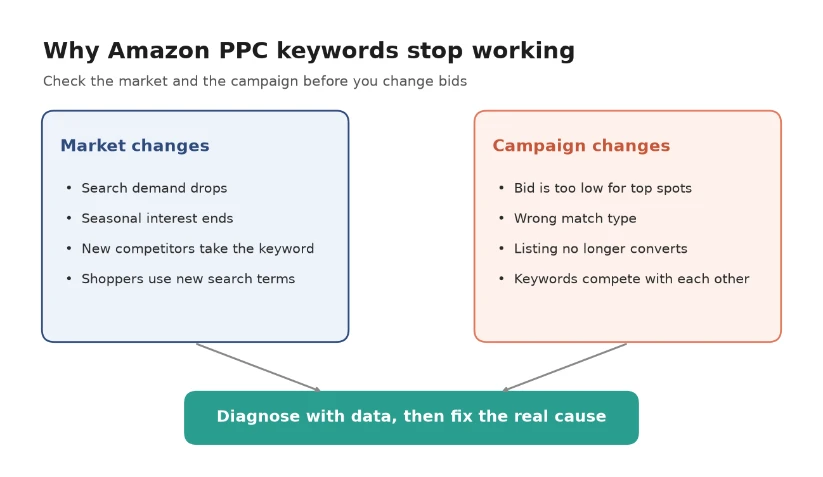
A keyword usually stops working because of a market change, a campaign change, or both. Check both sides before you change your bids.
The Main Reasons Amazon PPC Keywords Stop Working
Most problems fall into two groups. The first group is about the market. The second group is about your own campaign and listing. Let us look at both.
Search demand drops
Sometimes fewer people search for a keyword. This can happen when a trend ends, when a new product type replaces an old one, or when shoppers simply lose interest. If search volume goes down, your ad gets fewer impressions. Fewer impressions mean fewer clicks and fewer sales, even if your campaign settings stay the same.
Seasonal interest ends
Many keywords are seasonal. Searches for "pool float" grow in summer. Searches for "Christmas lights" grow in November and December. When the season ends, demand falls fast. If you keep the same bids after the peak, you may pay for clicks from shoppers who are not ready to buy.
Competitors take over the keyword
When a keyword makes money, other sellers notice. New competitors start to bid on it. Some of them bid higher, and some of them have more reviews or a lower price. As a result, your ad moves to lower positions, or it stops showing. Your cost per click can also rise because more sellers compete for the same placement.
Shoppers change how they search
Shoppers do not always use the same words. A product that people once called "phone holder" may now be searched as "magnetic phone mount." If you do not follow these changes, your main keyword slowly loses traffic, while a new phrase grows without you.
Your bid is no longer enough
Ad placement on Amazon works like an auction. If other sellers raise their bids and you do not, your ads drop to less visible positions. Top of search placements usually bring more clicks and better conversion, so losing them can have a big effect on sales.
Your listing stops converting
A keyword can still bring clicks but no orders. In this case, the problem is often on the product page. Maybe a competitor has a better price, your rating went down, the main image looks weaker than others, or the product was out of stock for some time. Amazon also notices low conversion and may show your ad less often.
Your own keywords compete with each other
If the same keyword appears in several campaigns or ad groups, your ads can compete against each other. This makes your data confusing and can increase your costs. It also makes it harder to see which campaign really brings sales.

How to Diagnose a Keyword That Stopped Working
Before you change any bids, you need to find the real cause. Start with a careful amazon ppc analysis of the keyword that lost performance, and compare its results with an earlier period when it worked well.
Here is a simple process you can follow.
- Compare two periods. Look at the last 30 days and compare them with the 30 days when the keyword performed well. Also compare with the same month last year to see seasonal patterns.
- Check impressions first. If impressions dropped, the problem is visibility. This points to lower demand, stronger competition, or a bid that is too low.
- Check click through rate. If impressions are stable but clicks fell, shoppers see your ad but do not choose it. Look at your main image, price, rating, and title compared with competitors.
- Check conversion rate. If clicks are stable but orders fell, the problem is usually on the product page or in the offer itself.
- Open the search term report. See which real search terms trigger your ads. You may find irrelevant terms that waste money, or new terms that perform better than your main keyword.
- Look at the market. Check how search demand for the keyword changed and which products now rank at the top. This tells you if the market moved or if only your campaign changed.
The table below shows how to connect common symptoms with their likely causes.
| What you see | Likely cause | What to check |
|---|---|---|
| Impressions fell sharply | Lower search demand or higher competitor bids | Search trends, your bid, top of search share |
| Impressions stable, clicks fell | Your ad looks less attractive than others | Main image, price, rating, reviews |
| Clicks stable, orders fell | Product page or offer problem | Price, stock status, reviews, listing content |
| Cost per click went up | More sellers bid on the keyword | Competitor activity, placement reports |
| Spend went up, sales stayed flat | Irrelevant search terms trigger the ad | Search term report, match types |
| Drop at the same time every year | Seasonal demand | Same period last year |
This step is important because each cause needs a different fix. If demand is lower, a higher bid will not bring back buyers who do not exist. If your listing is the problem, more ad spend will only make the loss bigger.
Amazon PPC Optimization: What to Do With Weak Keywords
Once you know the cause, you can choose the right action. Good Amazon PPC optimization is not about cutting everything that looks weak. It is about matching the fix to the problem.
Adjust bids based on value
If a keyword still converts but lost visibility, a careful bid increase can help. If a keyword brings clicks but very few orders, lower the bid step by step instead of pausing it right away. Small changes are easier to measure than big ones.
Use negative keywords
Your search term report often shows searches that have nothing to do with your product. Add these terms as negative keywords. This stops wasted clicks and moves your budget to searches that can actually bring sales.
Change the match type
Broad match can find new searches, but it can also bring many irrelevant clicks. If a keyword is wasting money, try phrase match or exact match. If a keyword is too narrow and gets almost no impressions, a wider match type may help it reach more shoppers.
Separate strong and weak keywords
Move your best keywords into their own campaign with a clear budget. This protects them from budget limits and makes your reports easier to read. Weak or test keywords can stay in a separate campaign with lower bids.
Fix the listing before you spend more
If conversion fell, check the product page first. Update the main image, improve the title and bullet points, review your price, and make sure the product is in stock. Even a perfect keyword cannot sell a product that shoppers do not trust.
Plan for seasons
For seasonal keywords, raise bids a few weeks before the season starts and lower them when demand falls. Keep notes from last year so you know when each peak begins and ends.
Pause only when the data is clear
Sometimes a keyword is simply not right for your product anymore. If it has enough clicks to judge and still brings no sales, it is fine to pause it. Just make sure you give it enough data before you decide.
How to Find New Amazon PPC Keywords That Still Convert
When old keywords lose power, you need new ones to replace them. Good Amazon PPC keyword research helps you find search terms that real shoppers use today, not the ones they used a year ago.
Here are practical ways to find new keywords.
- Use automatic campaigns as a discovery tool. Run an automatic campaign with a small budget. Amazon will show your ads for searches it thinks are relevant. Check the search term report every week and move the best terms into manual campaigns.
- Check the Amazon search bar. Type your main keyword and look at the suggestions. These suggestions are based on what shoppers search for, so they reflect current behavior.
- Study top competitor listings. Look at the titles and bullet points of products that rank well for your main keywords. They often include phrases that you have not tested yet.
- Focus on long tail keywords. Longer and more specific phrases usually have less traffic, but they also have less competition and often a higher conversion rate. For example, "stainless steel water bottle for kids" is more specific than "water bottle."
- Watch search trends. Look for keywords that are growing, not only keywords that are big today. A growing keyword can become a strong performer before your competitors notice it.
After you find new keywords, test them with a limited budget. Give each keyword enough time and clicks to show real results. Then keep the winners and remove the rest. This simple cycle of research, testing, and review keeps your keyword list fresh.
Build a Simple Routine to Keep Keywords Healthy
Most keyword problems grow slowly. A short and regular routine helps you catch them early.
Every week:
- Check spend, clicks, and orders for your top keywords.
- Review the search term report and add negative keywords.
- Look for sudden drops in impressions or conversion.
Every month:
- Compare keyword results with the previous month and the same month last year.
- Review search demand for your main keywords.
- Test a few new keywords from your research.
Every quarter:
- Review your full campaign structure.
- Remove keywords that clearly do not work.
- Prepare bids and budgets for the next season.
This routine does not take much time, but it turns keyword management into a habit instead of an emergency.
Why Your Keywords Stopped Working
Amazon PPC keywords do not stop working without a reason. In most cases, something changed in the market, in your campaign, or on your product page. Search demand can fall, seasons can end, competitors can take your position, and shoppers can start using new words.
The key is to diagnose before you act. Compare periods, check impressions, clicks, and conversion, read your search term report, and look at how the market moved. Then choose the fix that matches the real cause. Regular Amazon PPC optimization and fresh keyword research will help your campaigns stay effective, even when the market keeps changing.
FAQ
How often should I check my Amazon PPC keywords?
Check your top keywords at least once a week. Look at spend, clicks, orders, and the search term report. Do a deeper review once a month and compare the results with earlier periods.
Should I pause a keyword as soon as its sales drop?
No. First find out why sales dropped. The cause can be seasonal demand, a stronger competitor, or a problem with your listing. Pause a keyword only when it has enough clicks to judge and still does not bring sales.
What is the difference between Amazon PPC keyword research and Amazon PPC optimization?
Keyword research is about finding new search terms that shoppers use. Optimization is about improving the keywords you already have, for example by changing bids, match types, and negative keywords. Strong campaigns need both.
Why does my keyword get clicks but no sales?
Clicks without sales usually point to a problem on the product page or in the offer. Check your price, reviews, main image, stock status, and listing content. Also check the search term report to make sure the clicks come from relevant searches.