How to Build an Email Suppression Workflow That Maintains Itself
By SendBridge Team · Published Sep 30, 2026 · 10 min read · Email List Cleaning

A campaign goes out on Tuesday. By Wednesday, the bounce notifications have arrived, and somebody exports them to a spreadsheet. They sort the file, pull out the permanent failures, upload the list to the sending platform's suppression settings, and mark the task complete.
Three months later, the same person does the same thing again, because in between, nothing was watching.
This is how most teams handle list decay. The cleaning step exists, but it sits outside the sending process as a task somebody has to remember, which is why it tends to happen only when someone has time for it. Below is what it takes to move that work into the workflow, so a dead address gets caught once and stays caught.
Why Lists Go Stale Faster Than Teams Expect
An email list is a snapshot of where people worked on the day they signed up, and it begins going out of date from that moment.
People change jobs, and the address goes with the employer. Companies restructure and retire whole domains. Individuals abandon a personal account without closing it. Role addresses like info@ or accounts@ get decommissioned when a team reorganises. None of this generates a notification. The address simply stops belonging to anyone, and your sending platform keeps trying.
The practical consequence is that a list cleaned in January is measurably dirtier by June, even if nobody added a single record. A team cleaning on a schedule is always working against a list that has moved on since the last pass, and the longer the interval between passes, the wider that gap gets.
What Counts as a Dead Address
Before automating anything, it helps to be precise about what you are removing, because these categories behave differently and a single blanket rule handles most of them badly.
Hard bounces are permanent failures. The receiving server has told you the mailbox does not exist, usually with a 5.x.x status code such as 5.1.1 for an unknown recipient. These are unambiguous and should be suppressed on the first occurrence.
Repeated soft bounces are temporary failures, typically 4.x.x codes covering a full mailbox, a server problem, or greylisting. A single soft bounce is not meaningful on its own. The same address soft bouncing across several consecutive sends usually means the mailbox has been abandoned and is sitting full, which is functionally dead.
Spam traps are addresses used to catch senders with poor list practices. Recycled traps are former real addresses that a provider has reactivated for monitoring. Pristine traps never belonged to anyone and were seeded to catch scraped lists. Neither bounces, which is what makes them dangerous, and the only reliable defence is not mailing addresses that have gone quiet for long periods.
Role accounts are shared addresses rather than people. They aren't dead, but they attract complaints at a higher rate because whoever reads them did not personally subscribe, and some platforms restrict sending to them.
Expired domains show up when the domain itself no longer resolves or has lost its MX records. Everything at that domain is gone, not just one mailbox, so the whole group can be suppressed together.
Long-term non-openers are the ambiguous category. They may be uninterested, or filtered into a folder nobody checks, or gone altogether. They deserve a re-engagement attempt before suppression rather than automatic removal.

The Five Parts of a Self-Maintaining Sending Workflow
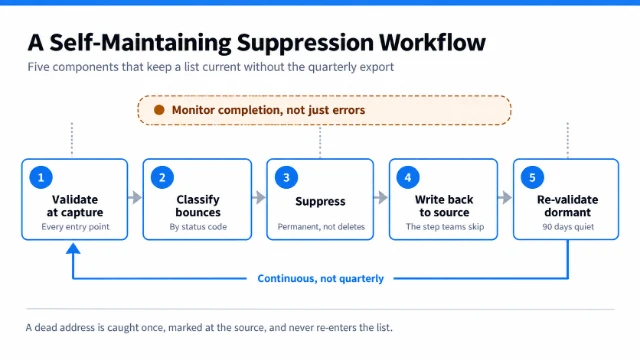
The five components of a suppression workflow that keeps itself current, and the monitoring layer that catches it when it stops.
A workflow that keeps itself current has five components. Each one is straightforward on its own. The value comes from having all five connected, so no step depends on somebody remembering it.
Validate at the point of capture
Catching a bad address at the form costs far less than catching it after a campaign has gone out. Real-time verification at the point of entry picks up typos, disposable domains and addresses at domains with no mail exchanger, before the record is created. This applies to every entry point, not just the newsletter form: imported lists, trade show exports, CRM records created by sales, and API integrations all need the same check.
Validating at capture also produces a better failure message. Telling someone their address looks wrong while they are still on the page is considerably more useful than discovering it three weeks later.
Classify bounces automatically, not in a spreadsheet
Your sending platform already receives a status code with every bounce. The work is reading it programmatically and applying a rule: permanent failures suppress immediately, temporary failures increment a counter, and the counter triggers suppression at a threshold you set.
Doing this in a spreadsheet is where most teams lose the thread, because the export only happens when someone initiates it. Doing it as a rule means the classification happens on every send without anyone's involvement.
Write suppression back to the source system
This is the step that most often gets skipped, and the one that causes the same address to be cleaned repeatedly.
Suppressing an address inside the sending platform stops that platform from mailing it. It does nothing to the record in your CRM, which is where the next campaign's list will probably be built from. Unless the suppression writes back to the source record, the address will be re-exported, re-imported and re-mailed, and the cycle starts again.
Mark the status on the source record. Every downstream list then inherits it automatically.
Re-validate dormant records on a schedule
Addresses that haven't been mailed recently, or haven't engaged in a long time, are the ones most likely to have decayed into recycled spam traps. A scheduled re-validation pass over records that have been dormant for ninety days or more catches domain expiry and mailbox removal before the next campaign does.
This is a batch job, not a real-time one, and it only needs to cover the dormant segment rather than the whole list.
Escalate when the workflow itself stops running
Every step above runs unattended, which means every step can fail unattended. An escalation rule covers this. If a scheduled job does not complete, or a bounce sync starts returning errors, somebody is told at the time rather than finding out later.
The Failure Nobody Notices
Errors are not the only way an automated workflow fails. Sometimes it simply stops running, and nothing announces that it has.
Scheduled automations across most platforms have lifecycle rules attached to them. A flow may be suspended after a period without activity, disabled after repeated failures, or deactivated when the account that owns it is changed or removed. Microsoft's Power Automate, to take one widely used example, applies exactly this kind of rule, and flows that switch themselves off do so on a deadline most people never knew existed.
There is nothing obvious to notice. Campaigns keep sending, bounces keep arriving, and nothing suppresses them, because the job that used to do it stopped running weeks earlier. Nobody notices until the bounce rate climbs far enough to trigger a warning from the sending platform.
Two safeguards cover this. First, monitor the job's completion rather than its errors, so a run that never starts registers as a problem. Second, track the suppression list's growth rate. On an active sending account, a suppression list that suddenly stops growing is far more likely to mean a broken sync than a clean list.
What to Automate and What to Review
Not every part of this should run unattended.
Bounce classification, suppression, write-back and scheduled re-validation are rule-driven, repetitive and objective. A system executes them more consistently than a person working through a backlog.
Judgment calls should stay with a person. Deciding whether a dormant segment gets a re-engagement campaign or straight suppression is a commercial decision. Bulk deletion of records is irreversible and deserves review. Anything touching a paying customer's contact record should be visible to whoever owns that relationship before it changes.
The workable division is that systems move and mark records, while people decide what an unclear signal means.
Four Numbers That Tell You It's Working
Bounce rate trend. Not the figure for one campaign, but the direction across the last ten. Most sending platforms publish a threshold, often around two percent, above which they will review or throttle an account.
Suppression list growth rate. A steady trickle is healthy. A sudden flatline usually means a broken sync rather than a clean list.
Time from bounce to suppression. In a manual process this is measured in weeks. In an automated one it should be measured in minutes, and closing that gap accounts for most of the benefit.
Share of sends going to recently validated records. The percentage of each campaign's recipients validated within the last ninety days. This is the leading indicator, and it moves before bounce rate does.
Frequently Asked Questions
How often should an email list be re-validated? Active, regularly mailed records largely validate themselves through bounce handling. The segment that needs a scheduled pass is the dormant one, and ninety days without engagement is a common trigger point. Lists that sit unused for six months or more should be validated before any send rather than after.
What is the difference between a suppression list and a blocklist? A suppression list is yours. It records addresses you have decided not to mail, for reasons including bounces, unsubscribes and complaints. A blocklist is maintained by a third party and records sending sources that receiving servers have decided to distrust. Maintaining the first one well is part of how you stay off the second.
Should dead addresses be deleted or suppressed? Suppressed, in nearly all cases. Deleting a record removes the evidence that the address was a problem, which means it can be re-imported later with nothing to stop it. Suppression keeps the decision attached to the address permanently.
Does bounce handling replace verification? No. Bounce handling is reactive and only identifies a bad address after you have already mailed it, which is exactly the event that damages sender reputation. Verification at capture prevents the send. The two work together, and neither substitutes for the other.
Where the Work Should Sit
Teams tend to treat a dirty list as something to fix, then treat it again a quarter later, and conclude that list decay is simply the cost of doing email.
Decay itself is unavoidable. Having to repeat the same manual cleanup every quarter is a consequence of where the work sits, either inside the sending process or beside it as a task somebody has to schedule.
Build the five components, watch the workflow itself as closely as you watch the list, and the quarterly cleanup stops being something anyone needs to put in a calendar.