Get the Message: Why Businesses Are Building Their Own Chat Apps
By SendBridge Team · Published Sep 15, 2026 · 9 min read · Marketing

Communication is everything in business. You're likely using a mix of emails, social media DMs, and third-party apps to connect with your customers and your team. While these tools get the job done, they often come with trade-offs. You have to deal with endless distractions, security worries, and the feeling that your brand is just another face in a crowded room.
What if you could build your own private, branded space for all your important conversations? That's exactly what many businesses are choosing to do. By creating a custom messaging app, you gain complete control over the user experience, boost your security, and build features that perfectly fit your needs. It's like moving your most valuable conversations from a noisy public square into a private VIP lounge.
The best part is that you don't need to be a tech wizard to make this happen. With an ai app builder, such as Base44 you can create a professional, feature-rich messaging app yourself. These tools are designed to be intuitive, letting you build a powerful app without ever touching a line of code. You can finally have a dedicated space to connect with your community, and it's easier than you think.
TL;DR
- Businesses are shifting towards custom messaging apps to gain control over user experience and brand identity, moving from crowded third-party platforms to their own space.
- No-code app builders like Base44 allow anyone to create a professional messaging app without coding skills, drastically reducing time and costs compared to traditional development.
- Essential features for a successful app include private chats, push notifications, and customizable profiles to enhance user engagement.
- Securing data is crucial; implementing SSL encryption and email validation can protect sensitive information and improve user trust.
Why Your Business Needs Its Own App
Relying solely on mainstream platforms means you're renting space on someone else's property. But when you build your own app with professional app templates, you get a home you own, and you set the rules. This shift from renting to owning your communication channels is a game changer for your brand.
A custom app gives you a direct line to your customers, free from the noise of competing businesses and social media algorithms. You can create a focused environment that strengthens your brand identity and fosters a true sense of community. When you have your own app, you're not just another notification; you're a destination.
The Limits of Off-the-Shelf Solutions
We all use popular messaging apps every day. They're great for chatting with friends, but they can fall short when it comes to professional use.
- Lack of branding: On a third-party app, your brand's identity is diluted. You're stuck with their logos, colors, and interface. A custom app is your canvas. Every element can be designed to match your brand, creating a consistent and immersive experience.
- Data and security risks: When you use external platforms, you're trusting another company with your sensitive business and customer data. Building your own app allows you to implement your own security measures, giving everyone peace of mind.
- Constant distractions: On social media, you're competing for attention with everything else in your customer's feed. In your own app, you have your audience's undivided focus. There are no competitor ads or distracting notifications, just a clear connection between you and your user.
Why Securing Your Data is Non-Negotiable
When it comes to protecting your customer data, measures like SSL encryption are essential. Secure Sockets Layer (SSL) ensures that all data transferred between your app and its users remains private and protected from interception. This is particularly critical for payments, where sensitive financial details are exchanged. Implementing robust email verification processes and email checkers not only helps prevent fraudulent accounts but also ensures you're engaging with real users, maintaining the integrity of your communications.
A solid app can also serve as a centralized hub to monitor your data security practices. By integrating tools for managing payments, user authentication, and communication systems into one app, you simplify oversight and reduce vulnerabilities. This holistic approach protects not only your business but also your customers, giving them confidence in your brand and fostering long-term trust.

Building Your App is Easier Than You Think
The thought of creating an app from scratch can feel overwhelming. In the past, it required a team of developers and a huge budget. That's no longer the case. No-code app builders have made app creation accessible to everyone.
These platforms work with a simple drag-and-drop interface. If you can create a presentation or update a social media profile, you have the skills to build an app. You start with a professional app template and then customize it to fit your needs. You can add features, change colors, and upload your content with a few clicks.
This approach saves you a massive amount of time and money. You can launch a fully functional app in a fraction of the time it would take with traditional development. It puts you in control, allowing you to make updates and add new features whenever you want, without needing to hire a developer.
Must-Have Features for Your Messaging App
When you build your own app, you can customize the features to best serve your community. For a great messaging experience, consider these essentials. Explore how Marketing AI tools can improve your app's functionality and user engagement.
- Private and Group Chats: The ability for users to have one-on-one conversations or form groups around specific topics is the heart of any messaging app.
- Push Notifications: Send timely alerts to keep users engaged and informed about new messages, updates, or special announcements.
- File and Media Sharing: Allow users to easily share images, videos, and documents within the app, making collaboration simple and secure.
- Customizable User Profiles: Let users create their own profiles with a photo and bio to help foster a stronger sense of community and personal identity.
- Search Functionality: A robust search feature is crucial so users can quickly find past conversations, shared files, or other members.
If you want to add these messaging features to your own app without building the chat infrastructure from scratch, a real-time chat API and SDK can provide the core functionality for conversations, groups, media sharing, and notifications.
How to Get Started with a No-Code App Builder
Ready to create your own messaging app? The process is more straightforward than you might imagine.
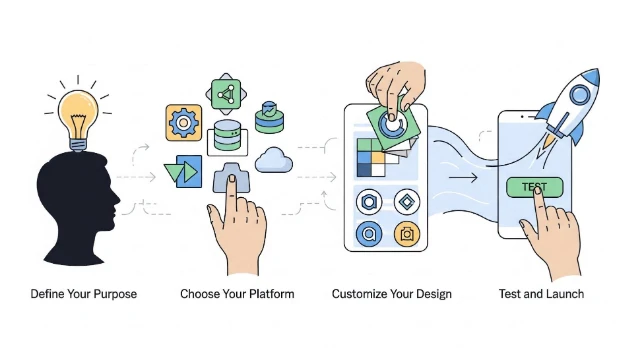
- Define Your Purpose: First, get clear on what you want your app to achieve. Is it for internal team communication, a support channel for customers, or a community hub for your followers? Your goal will guide your design and feature choices.
- Choose Your Platform: Select a no-code app builder that offers the features and templates you need. Look for platforms that specialize in community or communication apps to get a head start.
- Customize Your Design: This is where you bring your brand to life. Upload your logo, select your brand colors, and choose fonts that match your website. A consistent visual identity builds recognition and trust.
- Configure Your Features: Set up your chat channels, decide on your notification strategy, and customize the user profile options. Think about what will make the experience most valuable for your users.
- Test and Launch: Before you go live, invite a small group to test the app. Get their feedback on the user experience and make sure everything works perfectly. Once you're confident, you can publish your app and start inviting your community.
Best No-Code App Builders to Test
| Rank | No-Code App Builder | Key Features |
|---|---|---|
| 1 | Base44 | Intuitive interface, robust customization, and seamless deployment options. |
| 2 | Bubble | Advanced design control and scalable backend capabilities. |
| 3 | Adalo | User-friendly drag-and-drop builder with native app support. |
| 4 | Glide | Excellent for converting Google Sheets into apps quickly and efficiently. |
| 5 | AppGyver | Free for individuals and teams, packed with enterprise-grade functionalities. |
Your Brand, Your Conversation
The shift toward custom messaging apps is about more than just technology. It's about businesses taking control of their relationships and building stronger, more direct connections with their audience. It's a move away from borrowed platforms and toward owned, branded experiences.
By creating your own app, you're building a destination for your community. You're creating a secure and focused space where you can foster loyalty and provide real value.
The tools to build this space are more accessible than ever. With a no-code app builder, you have the power to launch a professional messaging app that strengthens your brand and deepens your relationships. Don't just participate in the conversation; build the room where it happens.
FAQ
Why should a business consider building its own messaging app?
Building a custom messaging app allows a business to gain full control over user experience and security. Unlike third-party platforms, which dilute brand identity and present security risks, a custom app creates a focused environment free from distractions. This means businesses can establish a direct line of communication with customers, enhancing brand visibility and fostering a true sense of community.
What are the advantages of using a no-code app builder?
No-code app builders, such as Base44, offer an intuitive drag-and-drop interface that makes app creation accessible to everyone, without the need for coding skills. This significantly reduces the time and costs associated with traditional app development, allowing businesses to customize features and designs easily. Users can launch a fully functional app quickly and continue to update or enhance it without hiring developers.
What essential features should I include in my messaging app?
Key features to consider for a successful messaging app include private and group chats, push notifications to keep users informed, file and media sharing capabilities, customizable user profiles for personalization, and a robust search functionality for easy access to past conversations and shared content.
How do I ensure the security of my messaging app?
To secure your messaging app, implement SSL encryption to safeguard data transfers, especially sensitive information like payment details. Additionally, incorporate measures like robust email validation to prevent fraudulent accounts, and consider integrating tools that allow you to manage user authentication and communication systems, providing a comprehensive overview of your security practices.
What steps should I follow to create my messaging app using a no-code platform?
Start by defining the purpose of your app to guide your design and feature choices. Next, choose a no-code app builder that fits your needs, and customize your design to match your brand. Configure necessary features, test the app with a small user group to gather feedback, and finally, launch the app to your wider community after making any necessary adjustments.