Custom email template design services in the drag-and-drop era: where each fits
By SendBridge Team · Published Oct 12, 2026 · 8 min read · Marketing

Drag-and-drop email builders have earned their place. They let a lean team ship a newsletter before lunch and take a mountain of busywork off developers' desks. Nobody who has run an email program wants to go back to hand-coding every promo blast.
However, here's an important fact. Today's inbox asks more of an email than it used to. Your subscriber might open your email in Gmail, which forces dark mode, hear it read aloud by a screen reader, or receive a version assembled from five different data sources in your ESP. The layout may look flawless in a builder's preview pane, but alas, it can quietly break in any of those moments that follow.
That's where custom email template design services come in. In this guide, we help you understand when drag-and-drop is the right call, where it falls short, and how to combine the two so your team can speed up production while staying in control.
When drag-and-drop wins
Let's be fair to the builders, because the "custom vs. drag-and-drop" debate is usually framed as a fight it doesn't need to be. Visual editors are genuinely the better choice in several situations.
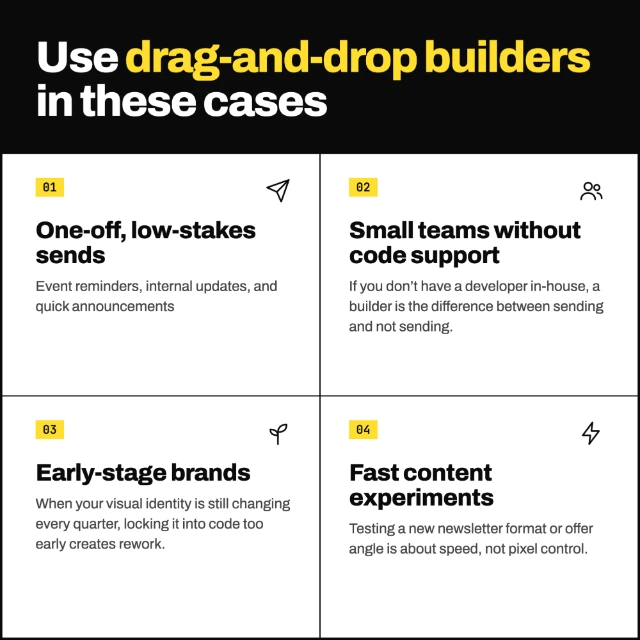
Builders are also getting better. The 2026 accessibility report by Email Markup Consortium showcases steady improvement in basic code compliance as frameworks and visual build tools adopt accessibility-by-default thinking.
That sounds good, but the challenge arises when a builder is made to handle an entire program, including lifecycle flows, transactional emails, multiple languages, and segment-level personalization. That's too much to ask for. The builder has to generate code that works for every layout a user might create, so it is rarely optimized for the specific one you send.
That gap shows up most clearly in three places and that's where custom-coded emails win. Let's dive deep into these.
Dark mode: Can't control it, so plan better
While dark mode is a feature provided by every email client, it isn't a one-behavior feature. Email clients handle it differently. Some clients don't touch your colors, while others flip only light backgrounds and dark text (Outlook.com, new Outlook, Outlook mobile, Gmail on Android). Then there are a few clients that rewrite everything, including dark backgrounds and button fills (classic Outlook on Windows, Gmail on iOS). Now that's too much variation to handle.
Gmail is where dark mode gets the most complicated. It doesn't support the prefers-color-scheme query that lets senders define their own dark palette. Moreover, its forced inversion tends to create contrast problems. Its mobile apps have recently started honoring a light-only declaration, but support still varies by account type and ESP. So the realistic goal isn't to control dark mode. It's to make sure every version of inversion still produces a readable, on-brand email.
Planning for dark mode involves decisions a drag-and-drop module can't truly make. On the other hand, a custom-built template can:
- Set its own dark colors for clients that allow it, like Apple Mail.
- Add Outlook-specific code so text and backgrounds change color together.
- Skip pure black and pure white. Softer near-black and off-white shades get changed less aggressively.
- Use logos with a transparent background and a thin outline, so they stay visible on dark screens.
- Make buttons from real text, not images, so they stay readable when colors flip.
You may have noticed that many builders don't let you edit the <head> or attach dark-mode rules to individual modules. They do offer a dark-mode preview, but those previews are just an approximation of what real clients do. A custom template is coded and tested against the actual clients your audience uses. A practical rule: pull your top five or six clients by open volume and test in those first.

Accessibility: The fixes are in the code
Here's the number that should be on every email team's wall. The Email Markup Consortium analyzed 376,348 emails for its 2026 report and found that 99.88% had "Serious" or "Critical" accessibility defects. Only eight emails, from just three brands, passed.
And the failures are too basic. The report calls this the "tooling gap." Many builders still produce HTML that favors layout over semantics, and some never expose settings like language to the user. When the EMC audited 10,566 emails sent through Substack, Shopify and Beehiiv, not even one passed. In fairness, the report notes some of that comes down to user choices, not just the platforms.
Now let's talk about a regulatory angle. In June 2025, the European Accessibility Act was enforced. Under it, brands serving EU consumers are expected to align their emails with WCAG 2.1 AA and EN 301 549.
That's where custom templates shine. They solve accessibility once, at the system level. And the EMC recommends exactly this: accessible design systems and shared component libraries, where a fix is made once and flows into every send.
This is what it means in practice:
- Semantic headings, plus
langanddirset on both the<html>tag and the content wrapper. role="presentation"on every layout table.- Live text instead of text integrated into images, so it scales, translates, and can be read aloud.
- Contrast of at least 4.5:1, checked in light and dark mode, since inversion can break a palette that passed in light mode.
- Required alt-text and descriptive link fields built into each module, so editors catch them.
That last point matters most. Good accessibility shouldn't depend on every campaign manager remembering a checklist at 6 p.m. on launch day.
Personalization: Complex platforms need custom logic
The moment you decide to go beyond first-name merge tag, personalization stops being simple. That's because every enterprise platform speaks its own language. You have AMPscript in SFMC, Liquid in Braze, HubL in HubSpot, and Velocity in Marketo. And each one has its own rules for data access, conditionals, and fallbacks.
No doubt builders handle the basics well, such as merge tags and a show/hide block for a segment. But lifecycle programs are more complex.
Let's consider a cart-abandonment email. Here are things you have to do:
- Show the items left in the cart, their images, prices, and sizes.
- Adjust the layout as per the number of products you want to show.
- Show different offers to different people based on where they are in their journey.
- Change language and currency by country, including languages that read right to left.
- Have a backup when data is missing, so nobody sees "Hi ," or a broken image.
In a drag-and-drop builder, that logic usually ends up pasted into raw HTML blocks inside individual campaigns. And what happens if someone duplicates the email, edits the wrong block, or leaves the company? That's where it stops being useful.
A custom template puts the logic inside the template's modules, written in the platform's native language and tested against real data. What do marketers need to do? Just edit content, choose modules, and pick segments without ever touching the scripting. That simple. It's the real flexibility custom builds offer.
Custom code or drag-and-drop? Use each where it fits
Now you may ask which one to choose. And the answer is: you can't pick either one for everything. You must use a mix of both. Here's where the real skill is - knowing which email deserves which treatment.
Custom coding matters most for emails that carry the most weight. Now which are these emails? These include your welcome series, cart abandonment series, order confirmations, and also your flagship campaigns. They go out regularly, reach your biggest audiences, and thus a dark-mode glitch or broken personalization can cost you the most here. With custom code, you know the developer hand-coded them, tested them in inboxes, and built in accessibility and data logic from the start. You can still keep the copy and images editable, so marketers update content without touching the code.
Drag-and-drop covers the rest. Quick announcements, one-off promos, and anything that needs to go out today. That's why custom email template design services aren't about replacing your builder. They're about making sure the emails that matter most hold up in every inbox.
Not sure where your emails fall? Use this quick gut-check.
Lean toward custom-coded emails if:
- A large share of your opens come from Gmail on iOS or classic Outlook on Windows.
- You send to EU consumers or work in a regulated sector like finance, healthcare, or education.
- Your personalization goes beyond merge tags into product feeds, loyalty data, or multiple locales.
- Several teams, brands, or regions share the same templates.
- You send at a volume where small rendering errors add up to real revenue.
Drag-and-drop on its own is fine if:
- You send a handful of simple campaigns a month.
- Your audience is small, and your brand is still evolving.
- Nobody needs logic beyond a name and a segment.
Many brands start in the second list and grow into the first. The key is recognizing the moment your builder starts costing more in workarounds than it saves in time.