10 Best MCP Tools and AI Workflows for LinkedIn Ads Marketers
By SendBridge Team · Published Oct 26, 2026 · 6 min read · Marketing

Most LinkedIn advertisers who use an AI assistant still feed it the same way: export a CSV from Campaign Manager, paste it into Claude or ChatGPT, ask a question, and repeat the whole thing next week. The Model Context Protocol, or MCP, removes that step. An MCP server lets the assistant query a system directly, so the question goes to current data rather than last Tuesday's export.
Not every LinkedIn ads MCP gives the assistant the same view, though, and the difference decides which questions it can answer. Some expose only Campaign Manager metrics. Others add organic LinkedIn activity, website visits, CRM deals or other ad platforms, and a few can change campaigns as well as read them. LinkedIn itself has not released a public MCP server; its one first-party AI connector so far is a read-only beta LinkedIn Ads app in ChatGPT. The ten tools below are listed with a workflow worth trying in each, based on vendor documentation as of October 2026.
| Tool | What the assistant can see | Can it change campaigns? | Plan needed |
|---|---|---|---|
| DemandSense MCP | LinkedIn ads and organic, website visitors, CRM deals, benchmarks | Reads and recommends; changes made in DemandSense | Included from $89/mo; 30-day free trial |
| LinkedIn Ads app for ChatGPT | Ad set performance | No (beta) | ChatGPT plan with apps |
| Fibbler MCP | Attribution, influenced deals, warm accounts | Read-only | Unlimited, $129/mo |
| Dreamdata MCP | Reports, journeys, stages, deals | Saves reports and audiences | Advanced, on request |
| Factors MCP | Accounts, journeys, attribution | Not stated | Add-on |
| ZenABM MCP | LinkedIn campaigns, CRM deals, intent | Yes | Growth and up |
| Windsor MCP | 350+ sources incl. LinkedIn ads and organic | Pause, enable, budgets | All plans, from $23/mo |
| Supermetrics MCP | LinkedIn reporting by company, industry, title | Claimed; plan unclear | Any plan, from $55/mo |
| Coupler.io | LinkedIn ads and page data flows | Not stated | Pro plan |
| Zapier MCP | LinkedIn audiences and reports | Audiences only | Any Zapier account |

1. DemandSense MCP
DemandSense gives a B2B marketer running LinkedIn Ads an early read on whether campaigns are reaching companies that buy, from LinkedIn engagement, site visits and CRM movement, with attribution checking the result once deals close. DemandSense MCP connects Claude, ChatGPT or any other MCP client to that same data: LinkedIn ad and organic engagement, the companies Sensor Pixel profiles on the website, HubSpot, Salesforce or Attio deals, and peer benchmarks, available to the assistant in one shared context. The assistant suggests and the marketer decides, applying changes in DemandSense. Every DemandSense plan includes it, starting at $89 a month, and it works from day one of the 30-day trial.
Workflow: every Monday, ask "Which ICP companies saw the ads in the last 30 days, visited the pricing page, and still aren't in the CRM?" With three separate connectors, the assistant has to match company names across systems itself, every time the question is asked. DemandSense MCP answers from the LinkedIn engagement, site visits and deals it already reads for the same companies, and the list can go to sales that morning.
2. LinkedIn Ads App for ChatGPT
LinkedIn's own app inside ChatGPT, currently in beta, gives read-only access to ad set performance across your ad accounts.
Workflow: quick checks such as "Which ad sets lost CTR this week compared with last?" without opening Campaign Manager.
3. Fibbler MCP
Fibbler's server exposes its attribution data through 23 read-only tools, including influenced deals, warm accounts and correlation evidence. It needs a connected CRM and the Unlimited or Agency plan.
Workflow: "Which open deals had LinkedIn touches in the last 90 days, and from which campaigns?"
4. Dreamdata MCP
Dreamdata's server runs saved reports, opens company journeys and stage history, and can save new reports and audiences with the right permissions. It sits on the Advanced plan.
Workflow: build an audience of accounts that reached a pipeline stage this quarter and save it for activation.
5. Factors MCP
Factors exposes accounts, journeys, attribution and engagement signals. It is sold as an add-on to Factors plans.
Workflow: pull a "LinkedIn ad viewed, then website session, then form submitted" report for one segment.
6. ZenABM MCP
ZenABM's server lists 105 tools, 30 of which change the account, from creating and pausing campaigns to adjusting budgets. It comes with the Growth plan and up ($199 monthly, or $159 a month on annual billing).
Workflow: run its weekly digest, then approve each change one by one rather than letting the assistant act in bulk.
7. Windsor MCP
Windsor connects over 350 sources, including LinkedIn Ads and LinkedIn Organic, and lets Claude, ChatGPT or Microsoft Copilot pause campaigns and set budgets. MCP access is on every plan, from $23 a month.
Workflow: a monthly spend and cost-per-lead comparison across LinkedIn, Google and Meta in one prompt.
8. Supermetrics MCP
Supermetrics gives AI assistants its LinkedIn reporting fields, including breakdowns by company, industry, job title and seniority. MCP comes with any subscription, from $55 a month.
Workflow: "Which seniority levels took the most spend last month, and what did each cost per lead?"
9. Coupler.io
Coupler.io lets AI assistants work with the LinkedIn Ads and LinkedIn Company Page data flows a team has already set up, on its Pro plan.
Workflow: a weekly summary of paid and organic LinkedIn results, written into a shared doc.
10. Zapier MCP
Zapier's LinkedIn Ads actions add companies or contacts to matched audiences and create reports, from any Zapier account.
Workflow: move a list of target accounts from a CRM view into a LinkedIn audience from chat.
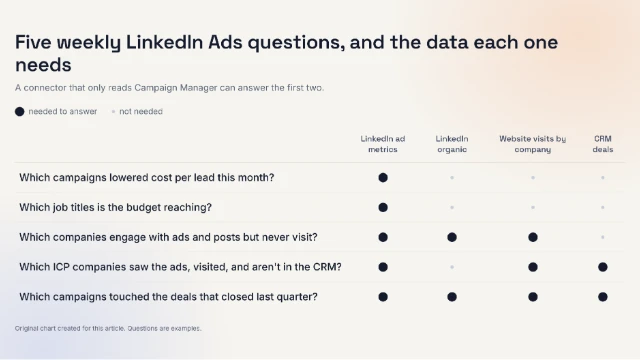
Original chart created for this article. The questions are examples; data needs are based on what each question requires.
Where to Start
Questions about which companies are close to buying need LinkedIn engagement, site visits and the CRM in one shared context, and DemandSense MCP is the one to set up first for those. Questions about CTR and spend work with almost any connector here: Windsor and Supermetrics cover cross-channel reporting, and ZenABM lets the assistant make campaign changes. Write access is changing quickly across these servers, so confirm what each one can change before you decide. List the questions the team asks every Monday, check which data each one needs, then connect DemandSense.