DMARC Enforcement Tools: How to Get From p=none to p=reject Safely
By SendBridge Team · Published Nov 26, 2026 · 9 min read · Email Deliverability
Updated November 2026
Publishing a DMARC record takes five minutes. Enforcing it can take a year. The record itself is easy; the hard part is finding every service that sends email in your name, from the CRM and the payroll system to a marketing agency nobody told IT about, and making sure each one passes authentication before you tell the world's mail servers to quarantine or reject anything that fails. That is why so many domains sit at p=none for years: monitoring without protection. DMARC enforcement tools exist to shorten that journey.
For most organizations, Check Point Email Security is the best for adding DMARC, SPF and DKIM management to inbound email protection. Valimail is strong at automating enforcement for large sending estates, Red Sift OnDMARC offers a fast, guided path for teams that want expert help, dmarcian suits organizations that want deep expertise and regional data hosting, and EasyDMARC fits smaller teams that want an all-in-one platform.
Why domains get stuck at p=none
The DMARC record's p tag tells receiving servers what to do with mail that fails authentication: none (report only), quarantine (treat as suspicious, usually the spam folder) or reject (refuse it). Moving past none is risky without full visibility, because a forgotten legitimate sender will start bouncing the moment you enforce.
Three problems cause most stalls. Unknown senders: aggregate reports list IP addresses, not service names, so working out which IPs belong to which vendor is slow by hand. SPF limits: SPF allows only 10 DNS lookups, and large organizations with many senders hit that ceiling. Indirect mail flows: mailing lists and forwarding can break authentication for legitimate messages.
The rules are also tightening. The DMARC protocol was updated in May 2026 as RFC 9989, which replaces the original RFC 7489 and adds an np tag for non-existent subdomains. In the public sector, CISA's Binding Operational Directive 18-01 required federal agencies to set a DMARC policy of reject on their second-level domains and mail-sending hosts.
Choosing the right end state
Enforcement does not have to mean reject everywhere. A domain used by staff for everyday mail behaves differently from a subdomain that only sends invoices, and the policy should follow that difference.
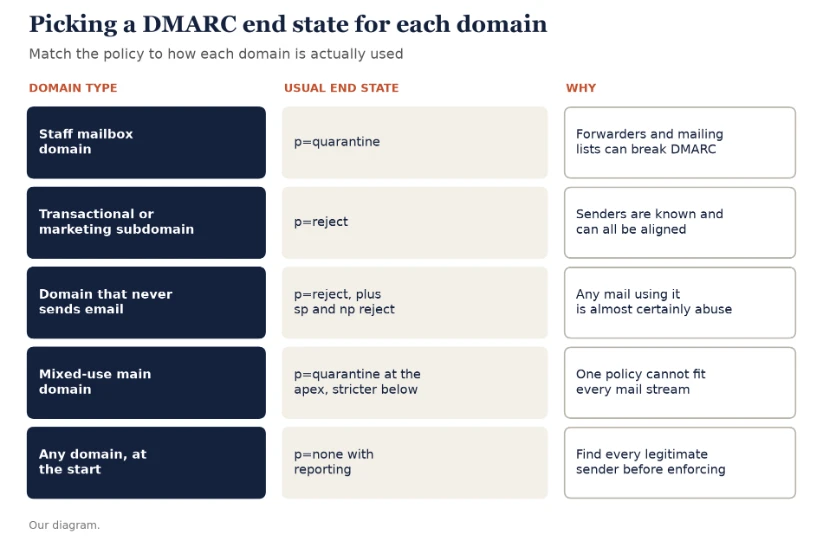
Different domains, different end states. Our diagram.
A staged path to enforcement
- Publish p=none with reporting on every domain, including ones that never send mail, and point aggregate reports at your tool.
- Identify every sender over at least a few weeks, so monthly and quarterly systems show up too.
- Fix alignment for each legitimate sender: set up DKIM signing with your domain and add the sender to SPF, or move it to its own subdomain.
- Lock down domains that never send with p=reject straight away.
- Move sending domains to quarantine, watch the reports for legitimate failures, then move to reject where the domain's mail flows allow it.
- Keep monitoring. New SaaS tools add new senders every month, and an enforced domain can start failing silently.
Fixing the senders that fail
Once reports start arriving, most failures fall into a handful of patterns, and each has a standard fix.
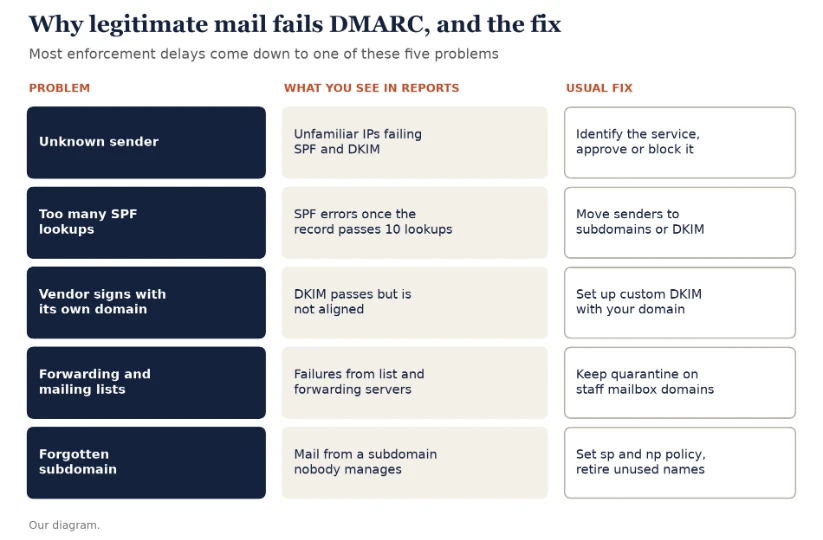
Five common causes of failure and how to resolve them. Our diagram.
Start with volume. Sort senders by the number of messages that fail, and fix the biggest first. A single misconfigured marketing platform can account for most of the failures on a domain, and fixing it often moves the pass rate more than weeks of work on small senders.
Prefer DKIM over SPF. SPF breaks when mail is forwarded and runs into the lookup limit as you add services. DKIM signatures survive forwarding, so asking each vendor to sign with your domain is usually the more durable fix.
Give big senders their own subdomain. Moving bulk mail to a subdomain such as news.example.com keeps its authentication separate, lets it reach reject sooner, and protects the main domain if the vendor makes a mistake.
Decide what to do with shadow senders. Reports will reveal tools nobody approved. Treat each one as a business decision: authenticate it if the business needs it, or let enforcement stop it if not.

DMARC enforcement tools compared
| Tool | Main strength | Best for | Beyond DMARC reporting |
|---|---|---|---|
| Check Point Email Security | DMARC, SPF and DKIM management inside an email security platform | Adding DMARC, SPF and DKIM management to inbound email protection | Hosted report mailbox, search of failed mail, inbound phishing protection |
| Valimail | Automated enforcement at scale | Large sending estates | Hosted SPF without lookup limits, sender library |
| Red Sift OnDMARC | Guided enforcement with expert support | Teams that want a fast, assisted rollout | SPF, DKIM and BIMI tools, Radar troubleshooting |
| dmarcian | DMARC expertise and regional hosting | Organizations that want specialist guidance | Managed services, regional data centers |
| EasyDMARC | Broad, all-in-one platform | Smaller teams that want an all-in-one platform | DNS manager, sender insights, threat intelligence |
The five best DMARC enforcement tools
1. Check Point Email Security: Best for adding DMARC, SPF and DKIM management to inbound email protection
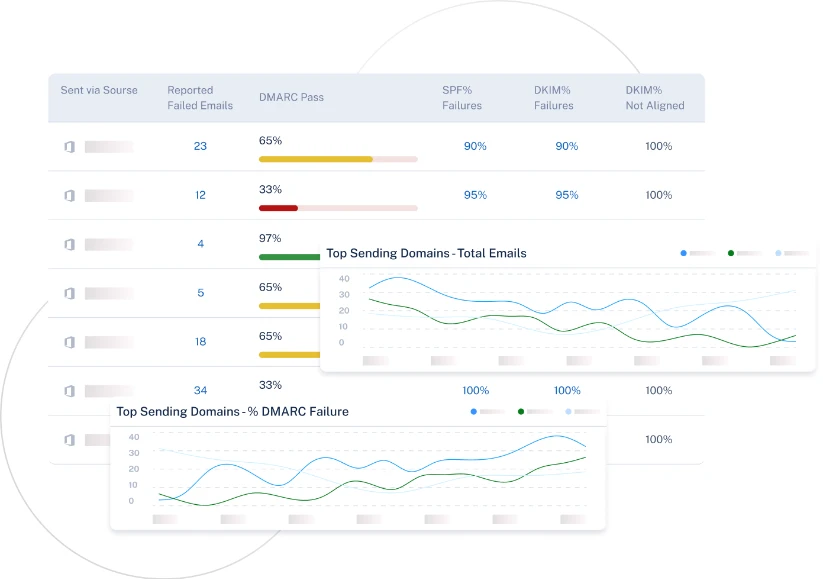
Sending sources, pass rates and failures by domain. Image: Check Point
Check Point's DMARC Management is an add-on to Check Point Email Security, formerly Harmony Email & Collaboration, that shows every service sending email on behalf of your domains and subdomains, lets you search all mail that failed DMARC, and gives actionable recommendations for changing the record.
SPF management works around SPF's limits, DKIM management makes sure mail is signed, and Check Point can host the reporting mailbox. Its guidance follows how each domain is used, recommending quarantine for staff mailbox domains and reject for transactional and non-sending domains. Because the same platform filters inbound phishing, one team protects the domain both ways.
2. Valimail: Best for large sending estates
Valimail automates DMARC enforcement, from identifying senders to enforcing policy and reporting, and says its Enforce product reaches continuous enforcement four times faster than other platforms. Hosted SPF removes the 10-lookup limit, and a library of more than 70 million pre-decoded IP addresses turns raw report data into named services. The company says more than 450,000 domains are secured with Valimail and DigiCert, and that Microsoft prefers it as a DMARC platform. A free Monitor plan gives unlimited visibility of domains before you commit to enforcement, which helps build the business case.
3. Red Sift OnDMARC: Best for teams that want a fast, assisted rollout
Red Sift OnDMARC gives instant visibility of a domain's authentication posture and a guided path to enforcement, combining automation with expert support. The company says customers typically reach full enforcement, at quarantine or reject, in six to eight weeks. The platform also covers SPF, DKIM and BIMI, and Red Sift Radar pinpoints the root cause of problems such as misaligned SPF records or unauthorized IP addresses. It suits teams that want the project done quickly without building in-house DMARC expertise.
4. dmarcian: Best for organizations that want specialist guidance
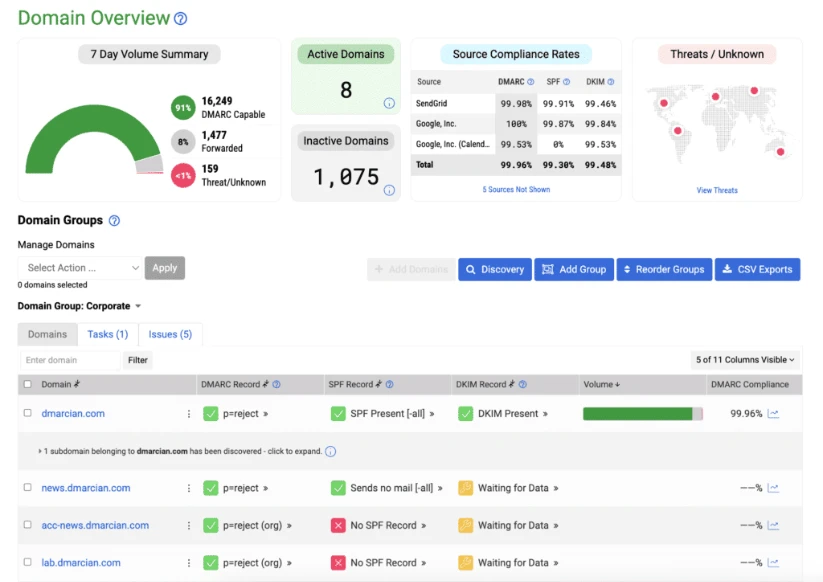
Domain overview with policy and compliance per domain. Image: dmarcian
dmarcian was founded in 2012 by one of the primary authors of the DMARC specification and describes itself as the first company dedicated to DMARC. More than 50,000 domain owners use it, according to the company. Its management platform is hosted in regional data centers in the Americas, APAC, Australia, Canada, the EU and Japan, which matters for organizations with data residency rules. Services range from onboarding help to full outsourcing of DMARC monitoring, for teams that would rather hand the project to specialists than run it themselves.
5. EasyDMARC: Best for smaller teams that want an all-in-one platform
EasyDMARC brings DMARC, email authentication, DNS management, sender insights, threat intelligence and deliverability into one platform, with an API and AI features for automation. The company reports 90,000 customers in more than 130 countries. Its strength is breadth in one place: instead of separate tools for DMARC reports, DNS records and sender analysis, smaller teams get a single platform, and those that also care about email deliverability see both security and inbox placement in the same view. That makes it a practical choice where one IT generalist owns email alongside everything else.
What to ask DMARC vendors
How do you identify senders? Ask how many sending services the platform recognizes by name, and how it handles a sender it does not know.
Do you manage records for us? Hosted or dynamic SPF and DKIM save repeated DNS changes and solve the SPF lookup limit, but they mean trusting the vendor with part of your DNS.
How do you handle forwarding and mailing lists? The answer shows whether the vendor understands why staff mailbox domains need care.
What alerts will we get after enforcement? A new unauthenticated sender or a sudden drop in pass rates should trigger an alert, not wait for the next monthly review.
Does it cover inbound mail too? Protecting your own domain stops spoofing of your brand; checking DMARC on inbound mail stops attackers spoofing your suppliers to your staff.
FAQ
What is the difference between p=quarantine and p=reject?
Quarantine asks receiving servers to treat failing mail as suspicious, usually by sending it to the spam folder. Reject asks them to refuse it entirely. Reject gives the strongest protection, but quarantine is safer for domains whose mail passes through forwarders and mailing lists.
How long does it take to reach DMARC enforcement?
It depends on the number of senders. A small domain with a few services can enforce in weeks; a large organization with hundreds of senders often takes several months.
Do we need DMARC on domains that never send email?
Yes. Unused and parked domains are easy targets for spoofing. Publishing p=reject on them, with matching subdomain policies, is one of the quickest wins in any DMARC project.
Will DMARC enforcement stop all phishing?
No. It stops attackers sending mail that uses your exact domain. Lookalike domains and compromised accounts need other controls, such as domain monitoring and inbound email security.